Pilex is a local AI casework assistant built for lawyers that reads case materials, automatically organizes facts and disputed issues with citations, and supports document drafting, contract review, comparison of two documents, and automatic deadline sync to calendar. Case data is encrypted locally and sensitive information is automatically desensitized when calling cloud AI, with offline access.
What is Pilex
Pilex is a local AI casework assistant built specifically for lawyers. Pilex can read case materials, automatically organize facts, evidence, and disputed issues, with every conclusion clearly cited; it supports AI drafting of complaints and lawyer's letters, clause-by-clause contract risk review, intelligent comparison of two documents, and automatic extraction of document deadlines into a calendar. Case data is encrypted and stored locally; when calling cloud AI, sensitive information is automatically desensitized, and you can still browse offline—making AI a reliable assistant.
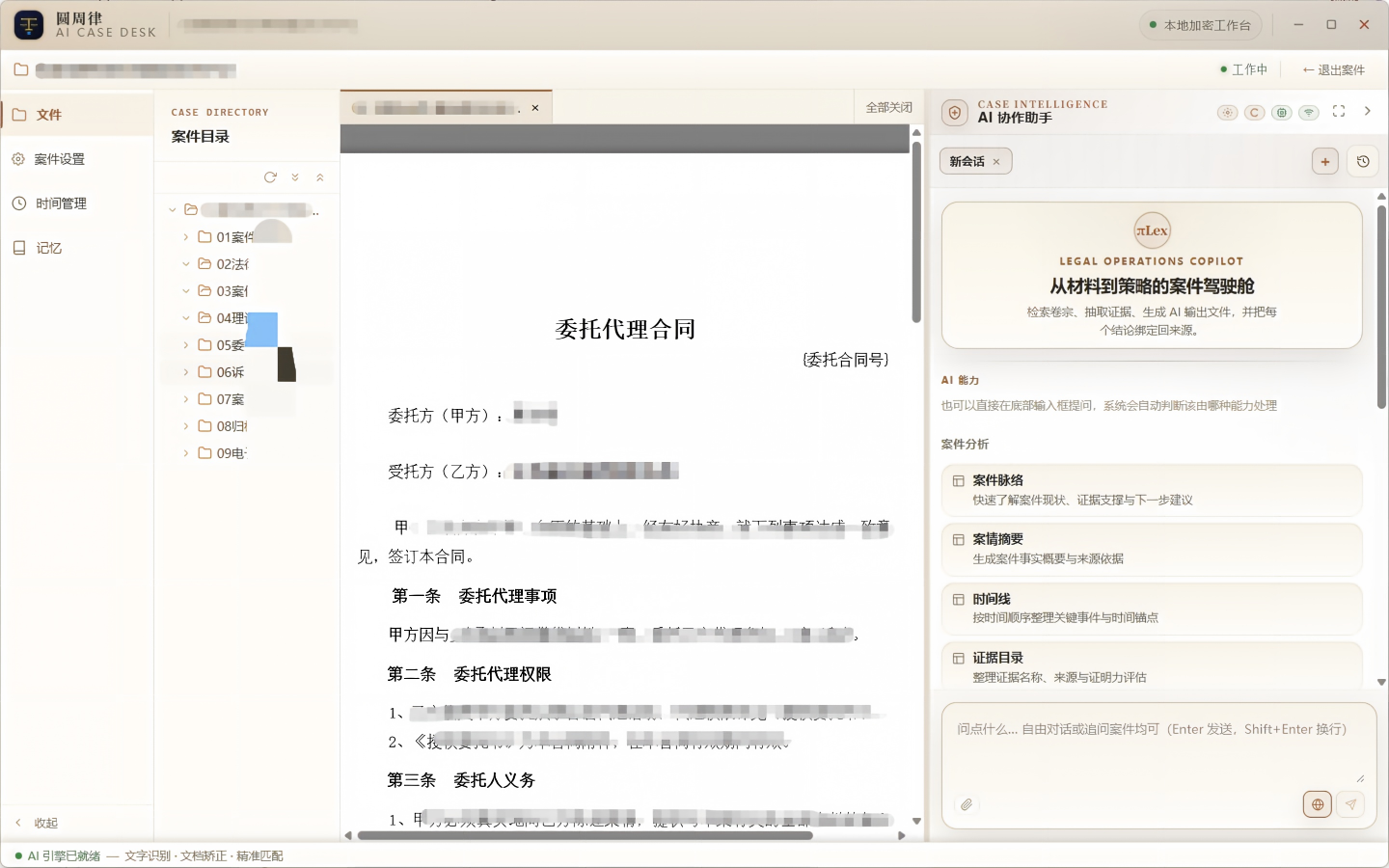
Main Features of Pilex
Pilex is a local AI casework assistant built specifically for lawyers: AI drafting of complaints/lawyer's letters/material organization, clause-by-clause contract risk review, intelligent comparison of two documents, and automatic extraction of document deadlines into a calendar. Case data is encrypted and stored locally; when calling cloud AI, sensitive information is automatically desensitized, making AI your reliable assistant.
- Smart Organization of Case Materials: AI automatically reads case materials, extracts facts, evidence, and disputed issues, with every conclusion citing its source.
- AI Drafting of Documents: One-click drafting of complaints, lawyer's letters, defense statements, and other legal documents—a first draft ready to use instantly.
- Clause-by-Clause Contract Risk Review: Identify legal risk points in the contract clause by clause and provide revision suggestions.
- Intelligent Comparison of Two Documents: Automatically compare the differences between two documents, quickly spotting changes and risky clauses.
- Automatic Deadline Sync to Calendar: Intelligently extract key dates such as proof deadlines and appeal periods from documents, automatically syncing calendar reminders.
- Full-Case Memory: Remembers where each case left off and your working habits, getting more useful the more you use it.
- Local Encrypted Storage: Case data lives only on your computer, accessible even offline.
- Automatic Sensitive-Information Desensitization: When calling cloud AI, client privacy and other sensitive information are automatically hidden—secure and compliant.
How to Use Pilex
- Download and Install: Visit the Pilex official website at https://pilex.yzsdai.top/ , choose the installed or portable version (.exe), and double-click to run.
- Configure the Model: Go to "Settings → Model Configuration", select a provider, paste your API Key, and click "Test Connection" to confirm the green light.
- Create Your First Case: Click "+ New Case" in the top-left of the main interface, name it in the format "Cause + Parties", and the system automatically generates a local case workspace.
- Import a Document: Drag PDF/Word/Excel files such as contracts or IOUs into the left file panel; the system automatically parses content, extracts key facts, and stores them in the knowledge base.
- Ask the AI: In the right-hand "AI Collaboration Assistant", type a question (e.g., "What is the current status of this case?"). Answers come with source citations you can click to jump to the original, and save useful ones as a draft with one click.
Core Advantages of Pilex
- Local Encrypted Data Storage: Case data is saved only on your computer, not uploaded to a server—privacy and security under your control.
- Automatic Desensitization on Cloud Calls: Sensitive information is automatically hidden when calling cloud AI, balancing AI capability with data compliance.
- Conclusions with Source Citations: Every analysis is cited, jumpable to original materials with one click—reliable and verifiable.
- Full-Case Memory: Remembers each case's progress and your working habits, getting more useful the more you use it.
- Available Offline: Local materials and drafts can be opened and browsed offline, free from network constraints.
- Free Model Switching: Supports over ten providers including DeepSeek, Tongyi Qianwen, OpenAI, and Kimi—choose as needed.
- Zero-Barrier Onboarding: No environment setup or technical background needed—install, enter your Key, and start working cases.
Application Scenarios for Pilex
- Litigation Case Analysis: Upload case materials such as contracts and IOUs; AI automatically sorts out the factual thread, disputed issues, and cites sources, quickly forming a case strategy.
- Legal Document Drafting: One-click drafting of complaints, defense statements, lawyer's letters, and other documents based on case materials—first draft ready instantly, save as a draft to continue editing anytime.
- Contract Risk Review: Identify legal risks clause by clause and provide revision suggestions, catching risks before signing.
- Multi-Document Comparison: Intelligent comparison of two documents, quickly spotting version differences and clause changes, preventing "yin-yang contract" oversights.
- Case Deadline Management: Automatically extract key dates such as proof deadlines and appeal periods from documents and sync to calendar, avoiding missed limitation periods.
Frequently Asked Questions
Q1: What is Pilex? A1: Pilex is a local AI casework assistant built specifically for lawyers. It can read case materials, automatically organize facts, evidence, and disputed issues with every conclusion cited; it supports document drafting, contract review, comparison of two documents, and deadline sync to calendar. Case data is encrypted locally, and sensitive information is automatically desensitized when calling cloud AI.
Q2: How is case data security ensured? A2: Case data is encrypted and stored only on your local machine, not uploaded to a server; when calling cloud AI, client privacy and other sensitive information are automatically hidden, and drafts and materials can be browsed even offline.
Q3: Which large language models are supported? A3: It supports over ten providers including DeepSeek, Tongyi Qianwen, OpenAI, and Kimi, freely switchable in "Settings → Model Configuration".
Q4: Do I need internet to use it? A4: No. Local case materials and drafts can be opened and browsed offline; internet is only needed when calling cloud AI for analysis.
Frequently asked questions
What is Pilex?
Pilex is a local AI casework assistant built specifically for lawyers. It can read case materials, automatically organize facts, evidence, and disputed issues with every conclusion cited; it supports document drafting, contract review, comparison of two documents, and deadline sync to calendar. Case data is encrypted locally, and sensitive information is automatically desensitized when calling cloud AI.
How is case data security ensured?
Case data is encrypted and stored only on your local machine, not uploaded to a server; when calling cloud AI, client privacy and other sensitive information are automatically hidden, and drafts and materials can be browsed even offline.
Which large language models are supported?
It supports over ten providers including DeepSeek, Tongyi Qianwen, OpenAI, and Kimi, freely switchable in Settings.
Do I need internet to use it?
No. Local case materials and drafts can be opened and browsed offline; internet is only needed when calling cloud AI for analysis.