
Zaoju is an AI production platform for short dramas, comic-style series and video: enter one idea or import a novel to get a script, generate consistent characters, scenes and props, break the script into shots, produce video shot by shot, then edit, dub and export the finished cut on a timeline.
What Is Zaoju: An AI Studio for Short Dramas and Comic Series, From One Sentence to a Finished Cut

Zaoju is an all-in-one AI production platform for short dramas, comic-style series and short video, built for individual creators and small production teams. It folds script writing, character and scene asset generation, shot breakdown, AI video generation and timeline editing into a single workflow. The pitch is simple: the distance between a script and a finished cut should be one "generate" button.
Making an AI narrative short used to mean rewriting the script in a writing tool, assembling character looks in an image tool, testing each shot in a video model, then aligning audio in an editor. Every hand-off costs a re-import, and character faces drift between tools. Zaoju chains those steps into one project: you enter a single idea or import an existing novel, the system writes a script, extracts and generates consistent characters, scenes and props, splits the script into shots, produces images and video shot by shot, and finishes with editing, voice-over and music on a timeline.
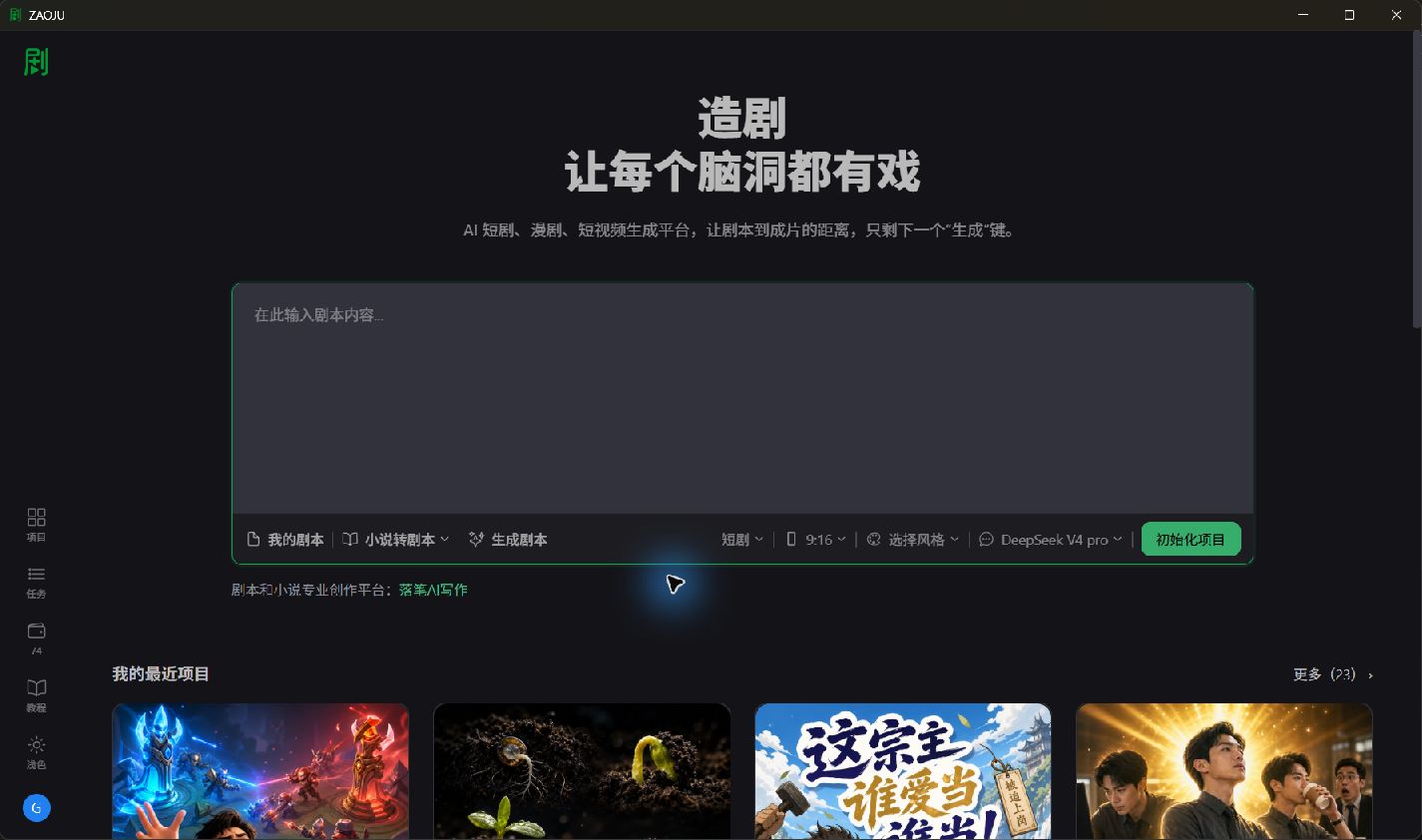
Key capabilities
- Script writing and adaptation: turn one sentence into a script, convert a short story or full novel into a script, or paste in a script you already have.
- Asset generation and management: the system extracts characters, scenes and props from the script and generates unified, reusable visual assets, with upscaling and redesign controls that address the classic cross-shot identity drift.
- Smart shot breakdown: the script is split into shots automatically, and each shot's description, framing size and composition can be adjusted and linked back to its assets.
- Multiple video generation paths: storyboards, segment content, shot scripts, first frame, first and last frame, grid images, continuation of the previous clip and video replacement, so each shot can take the route that fits it.
- 3D director stage: place characters and their facing in a 3D scene, manage multiple cameras, and switch between director view and camera view to preview composition for crowded scenes.
- Timeline editing and export: arrange clips, trim durations, add transitions, set dialogue, sound effects and background music, then export the finished cut.
- Multi-model orchestration: not locked to one model; combine DeepSeek text models, GPT Image image models and Seedance video models as needed.
How to use it
- Install the desktop client: download the installer from the official site, install, register and sign in to reach the workspace.
- Prepare a script: paste an existing script, adapt a novel with the novel-to-script tool, or generate one from a single idea.
- Initialize the project: choose the work type (short drama, comic series and so on), aspect ratio, visual style and text model, then confirm episode count and the estimated cost before creating the project.
- Generate visual assets: review the extracted characters, scenes and props and generate unified looks — this is what keeps identity stable across shots.
- Direct complex scenes (optional): for multi-character or multi-camera setups, block positions and cameras in the 3D director stage first.
- Produce shots: confirm the shot breakdown, tune framing and composition, then pick a generation method per shot to produce images and video.
- Edit and export: assemble shots on the timeline, add transitions, dialogue and music, preview, then export.
Where it fits
- Vertical short dramas: individuals or small teams shipping episodic drama without switching between four different tools.
- Comic-style series: building characters, scenes and shot art around an original or existing story to produce serialized content.
- Novel-to-video adaptation: giving existing prose a visual path by converting it into a shooting script and generating it shot by shot.
- Story-driven short video: accounts that need steady output benefit from reusable assets cutting the setup cost per episode.
- Team-scale production: multi-episode projects with many characters, locations and shots, where reusable assets absorb the repetitive work.
- Previsualizing crowded scenes: meetings, standoffs and ensemble scenes can be blocked in the 3D stage before committing to shots.
Limitations
- It is a desktop client, so you need to install it; there is no browser-only path.
- Episode count and estimated cost are confirmed at project setup, so long scripts need the scope decided up front.
- Output quality depends on the chosen models and how specific the shot descriptions are; vague prompts mean more retakes.
- Asset consistency greatly reduces identity drift, but extreme angles and complex motion still need a human picking takes.
- Distribution is on you: the platform exports the cut but does not manage publishing channels or platform review rules.
FAQ
Q: Can beginners with no film background use Zaoju? A: Yes as a starting point. Generating a script from one idea, converting a novel in one step, and the guided project setup let people without production experience follow the flow. Reaching broadcast quality still requires an understanding of shots, framing and pacing.
Q: How is this different from prompting a video model directly? A: Prompting a video model gives you isolated clips; characters and locations drift between them and there is no script or edit connecting anything. Zaoju keeps script, assets, shots, generation and editing inside one project, which is what continuity depends on.
Q: Is the 3D director stage mandatory? A: No. Two-person dialogue and simple shots can go straight from breakdown to generation. The stage pays off when you have multiple characters, blocking and camera changes.
Q: Do I need to prepare my own artwork? A: No pre-drawn art is required. Characters, scenes and props are extracted from the script and generated, then refined for look and resolution as needed.
Frequently asked questions
Can beginners with no film background use Zaoju?
Yes as a starting point. Generating a script from one idea, converting a novel in one step and the guided project setup let people without production experience follow the flow; broadcast quality still needs an understanding of shots, framing and pacing.
How is this different from prompting a video model directly?
Prompting a video model yields isolated clips with drifting characters and no script or edit connecting them. Zaoju keeps script, assets, shots, generation and editing inside one project, which is what continuity depends on.
Is the 3D director stage mandatory?
No. Simple shots can go straight from breakdown to generation; the stage pays off for multi-character blocking and camera changes.
Do I need to prepare my own artwork?
No pre-drawn art is required. Characters, scenes and props are extracted from the script and generated, then refined for look and resolution.



