

Warp Code is an AI coding tool from the Warp team with a built-in coding agent, code review, file editing and project management. It suits bug fixing, feature development, team code review, project initialization and learning to code.
Warp Code: The AI Coding Terminal From Prompt to Production
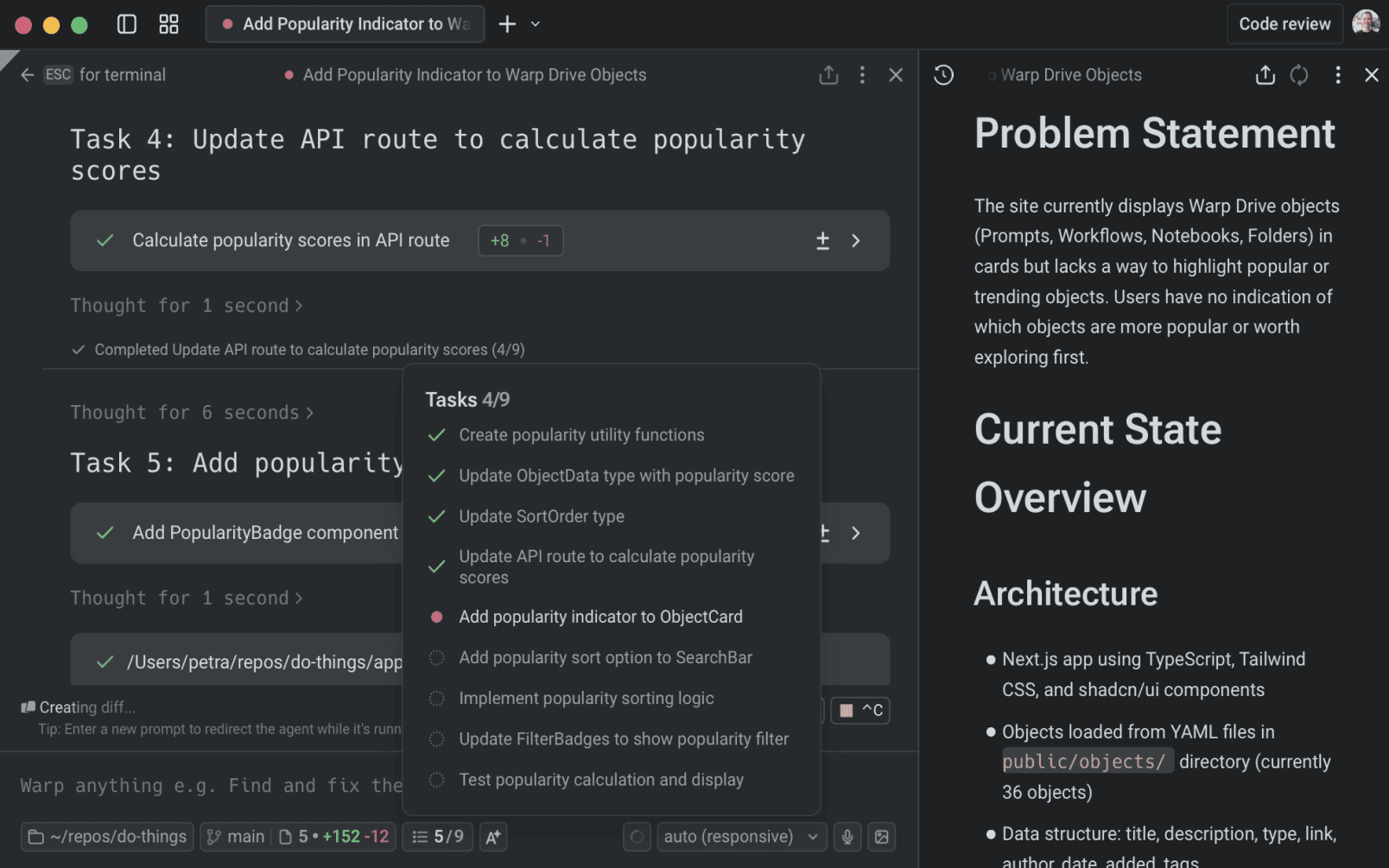
Warp Code is an AI coding tool from the Warp team, built to collapse the entire path from prompt to production into a single environment. It is not a chat window bolted onto a terminal; it layers a coding agent, a code review panel, a file editor and project configuration management on top of a modern terminal, turning Warp into a complete AI IDE.

Key capabilities
Top-tier coding agent. Warp's built-in agent ranks #1 on Terminal-bench and #3 on SWE-bench Verified with GPT-5, generating working code changes from natural-language prompts rather than offering isolated snippets.
Built-in code review. A dedicated review panel shows every change the agent produced, with line-level diff editing. Review and revision happen inside Warp, so there is no need to jump out to GitHub to compare differences.
Editable files. Warp opens and edits files directly with tabbed file views, syntax highlighting, a file tree and vim key bindings. Small adjustments to agent output can be made in place, without switching editors.
Project rules and global commands. WARP.md manages project-level rules and configuration and stays compatible with Agents.MD, Claude.MD and cursor rules. You can define separate agent profiles and start the right agent per task. Global slash commands such as /init, /add-rule and /add-server add rules, connect MCP servers or run saved prompts.
How to use it
- Install the client. Visit the official Warp Code site at https://www.warp.dev/code and download the Warp client.
- Launch Warp. Open the Warp terminal and enter the main interface.
- Create or open a project. From the welcome screen, start a new project or open an existing directory.
- Write a prompt. Describe the task in the main interface, for example "fix this bug" or "add this feature", and let the agent generate the code.
- Review the changes. Inspect everything the agent produced in the review panel and correct it with line-level editing.
- Edit files. When fine-tuning is needed, open the file in Warp and edit it using the file tree, syntax highlighting and vim bindings.
- Use global slash commands. Run
/init,/add-ruleor/add-serverto add global rules, register MCP servers or execute saved prompts. - Manage the project and commit. Maintain rules in WARP.md, then commit straight to Git or another version control system from within Warp.
Who it is for
- Fast bug fixes. Review, edit and commit defects in one environment, shortening the repair cycle.
- New feature development. Describe the feature, let the agent generate the code, then review and adjust locally to cut down manual coding.
- Team code review. Inspect agent-generated changes and correct them with line-level editing instead of hopping between tools.
- Project initialization. Scaffold structure and configuration quickly when starting a new project.
- Learning and teaching. Use generated code to get up to speed with a new language or framework.
Limitations to consider
Warp Code ships as a desktop client, so it must be downloaded and installed; there is no browser-only entry point. Agent quality depends on the underlying model, and the published benchmark results correspond to a specific configuration (the SWE-bench Verified result is based on GPT-5), so real-world performance varies with model choice and project complexity. Agent output still needs human review, and anything destined for production should be validated locally or on a test branch first.
FAQ
What is Warp Code? An AI coding tool from the Warp team that brings a coding agent, code review, file editing and project management into the terminal, covering the full path from prompt to release.
How is it different from a regular terminal? A regular terminal only runs commands. Warp Code adds an agent that understands natural language and produces code, a dedicated review panel, and a file editor with syntax highlighting and a file tree, effectively extending the terminal into an AI IDE.
Do I need to leave Warp to review code on GitHub? No. The built-in review panel shows all agent-generated changes and supports line-level diff editing, so review and revision stay inside the tool.
Which project rule files does Warp Code support? Rules and configuration live in WARP.md, which is compatible with Agents.MD, Claude.MD and cursor rules, and multiple agent profiles can be defined.
Who should use Warp Code? Developers who fix defects and ship features frequently, teams that need in-tool code review, and learners who want generated code to accelerate picking up a new language or framework.
Frequently asked questions
What is Warp Code?
It is an AI coding tool from the Warp team that brings a coding agent, code review, file editing and project management into the terminal, covering the full path from prompt to release.
How is it different from a regular terminal?
A regular terminal only runs commands. Warp Code adds an agent that understands natural language and produces code, a dedicated review panel, and a file editor with syntax highlighting and a file tree, effectively extending the terminal into an AI IDE.
Do I need to leave Warp to review code on GitHub?
No. The built-in review panel shows all agent-generated changes and supports line-level diff editing, so review and revision stay inside the tool.
Which project rule files does Warp Code support?
Rules and configuration live in WARP.md, which is compatible with Agents.MD, Claude.MD and cursor rules, and multiple agent profiles can be defined.
Who should use Warp Code?
Developers who fix defects and ship features frequently, teams that need in-tool code review, and learners who want generated code to accelerate picking up a new language or framework.



