

Trace APP is an AI scheduling app for Apple devices that creates events from typed text, spoken commands or screenshots, keeps reminders, to-dos, checklists, trackers and daily habits in one interface, and syncs across iPhone, iPad and Mac through iCloud with home screen widgets on top.
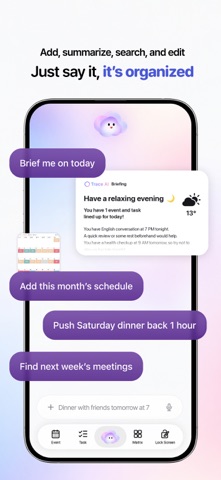
Trace APP: an AI assistant that keeps your calendar, habits and to-dos in one place
Trace APP is a productivity app that merges an AI assistant with day planning, aimed at iPhone, iPad and Mac users. It accepts typed text, spoken commands and screenshots as ways to create an event, gathers reminders, to-dos, checklists and trackers into a single view, and syncs across Apple devices through iCloud so you switch between apps less often.
The usual problem with planning tools is not a lack of features but too many entry points: the calendar holds events, the notes app holds ideas, a separate list holds tasks. Trace merges those entry points and lets AI translate a sentence, a voice note or a screenshot into a structured schedule.
For people already inside the Apple ecosystem it adds home screen widgets, so the day's agenda is visible without opening anything, and iCloud sync keeps an edit made on iPhone visible on iPad and Mac.
Six core capabilities
Smart calendar and planning
As an AI calendar and scheduling assistant it creates events from typed text, a spoken sentence or an uploaded screenshot, which covers work meetings, gym sessions or personal projects.
Daily habits and recurring events
Fixed routines such as a morning run or a study block can be set once and repeated, and weekly or monthly meetings follow the same recurring logic.
Feature integration
Reminders, to-do lists, checklists and trackers live in one place, so tasks, schedules and events are not scattered across several apps.
Natural language and voice control
Schedules can be described in plain language, and voice commands plus Siri shortcuts handle entry when typing is inconvenient.
iCloud cross-device sync
Schedules and tasks stay aligned between iPhone, iPad and Mac, and a change on one device appears on the others.
Widgets and personalisation
iOS widgets place today's agenda and tasks on the home screen, and the interface and features allow a degree of personal adjustment.
Getting started
- Install Trace APP from the App Store and grant calendar, reminder and notification permissions on first launch.
- Add a first event by typing, speaking or uploading a screenshot, then check that the parsed time and title are correct.
- Turn recurring routines such as a morning run or daily vocabulary practice into repeating events so they appear automatically.
- Enable iCloud sync across your Apple devices and add a home screen widget to keep the agenda in sight.
- Use voice commands or Siri shortcuts for quick additions during the day instead of typing everything.
Who it suits
- Apple users whose schedules and to-dos are spread across several apps and want one place to manage them.
- People with habits that need long-term tracking, such as exercise, study or a weekly review.
- Mobile users who prefer dictating or screenshotting an arrangement rather than typing it out.
Limits and caveats
- The source material does not disclose pricing, subscription tiers or regional availability, so check the App Store listing before installing.
- Cross-device sync depends on iCloud; without it, or outside Apple hardware, the experience is incomplete.
- Voice and screenshot recognition rely on system permissions, and parsed dates are worth double-checking manually.
- Public information does not describe data export or interoperability with third-party calendars, which matters if you plan to migrate later.
FAQ
What problem does Trace APP solve?
It consolidates reminders, to-dos, habits and the calendar in one app and uses AI to turn text, speech or screenshots into scheduled events.
Which devices are supported?
It targets the Apple ecosystem: iPhone, iPad and Mac, with iOS widgets and iCloud sync.
Can I set a habit that repeats daily?
Yes. Daily habits and weekly or monthly recurring events are both supported, created once and then repeated automatically.
Do I have to use voice input?
No. Typing and screenshot conversion both create events on their own; voice and Siri shortcuts are just faster routes.
Frequently asked questions
What problem does Trace APP solve?
It consolidates reminders, to-dos, habits and the calendar in one app and uses AI to turn text, speech or screenshots into scheduled events.
Which devices are supported?
It targets the Apple ecosystem: iPhone, iPad and Mac, with iOS widgets and iCloud sync.
Can I set a habit that repeats daily?
Yes. Daily habits and weekly or monthly recurring events are both supported, created once and then repeated automatically.
Do I have to use voice input?
No. Typing and screenshot conversion both create events on their own; voice and Siri shortcuts are just faster routes.



