

LibTV is an all-in-one AI video creation platform from LiblibAI that offers two entrances, an infinite canvas for people and a Skill interface for agents, with annual plans from CNY 499 to 6,599.
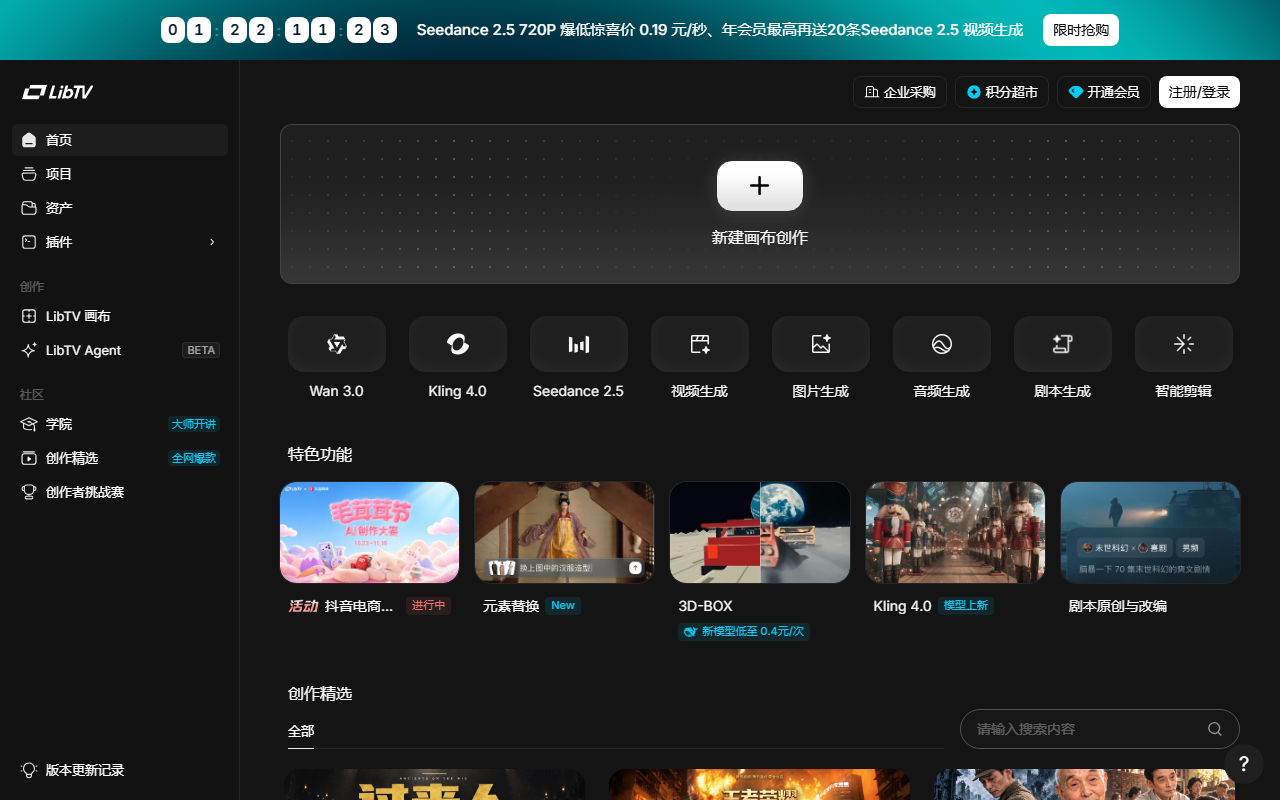
LibTV: LiblibAI's All-in-One AI Video Studio With Dual Entrances for Humans and Agents
LibTV is an all-in-one AI video creation platform built by LiblibAI. What sets it apart is a dual-entrance design: human creators assemble a production pipeline on an infinite canvas, while AI agents call the same capabilities through a Skill interface and turn a single sentence into a short drama, a style-cloned video or a music video.
A typical AI video workflow spans four separate places: a large language model writes the script, an image tool produces the first frame, a video model renders the shots, and an editor stitches everything together. Assets, style and character likeness tend to drift as material is carried from one tool to the next. LibTV's answer is to fold those steps into one canvas, where text, image, video, audio and script nodes can be placed and wired freely, so the whole project stays visible and editable in a single view.
The platform integrates image and video generation models such as Lib Nano Pro and Kling 3.0 and exposes them directly on the canvas. Around character consistency, the hardest part of AI video, it ships three-view character sheets, 360-degree angle rendering and a nine-grid multi-camera mode, so the same face survives across shots.
The second track is built for agents. LibTV opens a Skill interface: deploy a Personal Agent that supports Skills, such as OpenClaw or kimiclaw, install the LibTV Skill extension, then describe the task in natural language and let the agent orchestrate the models and run the pipeline end to end. Humans keep fine-grained control; agents handle volume delivery. That split is what separates LibTV from most tools in the category.
Key features
Infinite canvas workflow
Five base node types (text, image, video, audio, script) can be dragged, duplicated and connected, so a complex project is managed spatially and the entire pipeline sits on one canvas instead of scattered across tools.
AI production assistant
Script parsing, script optimisation, one-click reference-film analysis and multi-grid plot previews put an AI in the producer's chair, helping catch structural problems before rendering starts.
Character and camera control
More than twenty proprietary capabilities, including three-view character sheets, 360-degree angles, nine-grid multi-camera layouts, focus close-ups, lighting control, camera control, master-level camera moves, multi-shot and multi-frame generation, and precise video editing.
One-sentence short drama
Describe an idea and the agent handles script generation, character design, shot planning, video generation, sound effects and editing, delivering a finished piece of up to five minutes.
Reference video cloning
Paste a video URL and the agent reads its camera language and stylistic signature, then re-performs it into a brand-new piece in the same style, which suits batch content with a fixed look.
Music-driven music video
Upload an audio file and the agent analyses tempo and emotional arc, generates matching visual storytelling and cuts the result to the beat, removing the manual beat-matching pass.
Product film from a website
Give it a product landing page URL and the agent extracts selling points, designs a presentation rhythm and produces a promotional video, turning a web page directly into a script source.
Character design and screenwriting
Adjust facial features, hair, wardrobe and details visually to produce reusable character assets; the writing side drafts scripts from an idea, rewrites individual lines and conflicts, and flags how a change affects the outline and planted foreshadowing.
Director clone and 3D-BOX
A director clone is generated from a preset template or your own imported method, then splits shots, writes prompts and pushes them in batches. 3D-BOX needs no modelling: the agent builds sets and camera positions, and hand-drawn paths preview multi-shot camera movement.
Finishing touches
Title motion design and subtitle styling; for talking-head footage the platform rough-cuts automatically and matches B-roll and music, keeping the last mile of packaging inside the same tool.
How to use it
- Open the platform. Go to the LibTV website, register and sign in with a LiblibAI account. It runs in the browser with nothing to install.
- Create a project. Double-click an empty spot on the infinite canvas and pick a starting type such as story script, character three-view or audio-video generation.
- Lay out the pipeline. Drag text, image, video, audio and script nodes onto the canvas, arrange them freely and connect them so the project structure is visible in space.
- Call the pro tools. Select a node and use the twenty-plus functions in the top toolbar, setting parameters such as style tags to refine one stage instead of re-running the whole piece.
- Generate and iterate. Preview results directly on the canvas and adjust individual nodes rather than starting over.
- Take the agent route (optional). Deploy a Personal Agent that supports the Skill interface, install the LibTV Skill extension from GitHub or Clawhub, then describe the requirement in natural language and let the agent orchestrate the models.
- Start from a template. The story script entrance accepts a background brief or an existing outline and returns a full script that flows into storyboard images and shots; the character entrance takes a character or product image and offers instructions such as nine-grid multi-camera, facial three-view, four-grid plot inference, product three-view or a three-second look-ahead.
Pricing
- Professional: CNY 499 per year, 1,800 credits monthly, roughly 7,200 images or 180 videos, six concurrent jobs, 50 GB cloud storage.
- Master: CNY 1,299 per year, 5,800 credits monthly, roughly 23,200 images or 580 videos, ten concurrent jobs, 130 GB cloud storage.
- Flagship: CNY 2,999 per year, 15,800 credits monthly, roughly 63,200 images or 1,580 videos, twenty concurrent jobs, 200 GB cloud storage.
- Premium: CNY 6,599 per year, 34,000 credits monthly, roughly 136,000 images or 3,400 videos, unlimited concurrent jobs, 500 GB cloud storage, plus 300 free Kling generations.
- Shared benefits: 20 credits granted per daily sign-in and unlimited acceleration for members. These are the annual plans recorded in the source material; confirm current prices, credit rules and concurrency limits on the official site before purchasing.
Who it is for
- Short film and film makers: orchestrate script, storyboard, shots and editing on one canvas to produce a short or even a feature-length project end to end.
- Brand and advertising teams: generate product films straight from a landing page URL, or clone a reference style, to ship several cuts of a campaign quickly.
- Short-drama studios: test an idea by letting the agent deliver a five-minute episode, with script, characters, shots, sound and editing bundled into one handoff.
- Musicians and MV creators: upload a track and let the platform read tempo and mood to build visuals, a low-cost route to a music video for independent artists.
- Agent developers: wire video production into an existing agent workflow through the Skill interface for programmable, high-volume content output.
- Series work that needs consistency: the three-view sheet and 360-degree angles exist precisely to stop a recurring character from changing faces between episodes.
Limits and caveats
- Credits are the real constraint. Images and videos both consume credits, and the published image and video counts are estimates; actual burn depends on resolution, duration and retries, so test with a small sample before committing to a batch.
- Free allowance is small. Twenty daily sign-in credits cover only a few trial runs; real projects need a paid annual tier sized for budget and concurrency.
- The agent entrance has a setup cost. You must deploy a Skill-capable Personal Agent and install the extension yourself. Users uncomfortable with environments and configuration should start on the canvas.
- AI output still needs review. Character consistency, shot continuity and narrative logic can drift, so review shot by shot before delivery; commercial material also needs rights and likeness clearance.
- Prices and entitlements change. The tiers and credits here come from public material at collection time and may be revised, so check the official terms before signing up.
FAQ
How is LibTV different from a normal AI video generator?
Most tools solve a single step. LibTV puts script, storyboard, generation and finishing on one infinite canvas and additionally opens a Skill interface for agents, making it a pipeline-level rather than a point-level tool.
Can I use it without an agent?
Yes. The browser canvas is built for human creators and needs no configuration; the agent route is optional automation.
How long can a generated video be?
The one-sentence short drama route delivers pieces of up to five minutes. Individual shot length depends on the underlying model, so check the official documentation.
How do credits work?
They are spent per generation action, allocated monthly on annual plans (from 1,800 to 34,000), plus 20 per daily sign-in. Conversion rates are defined by the official credit policy.
Which models are supported?
The platform integrates image and video models such as Lib Nano Pro and Kling 3.0 and calls them from the canvas; what you can generate depends on those models' capabilities.


Frequently asked questions
How is LibTV different from a normal AI video generator?
Most tools solve a single step. LibTV puts script, storyboard, generation and finishing on one infinite canvas and additionally opens a Skill interface for agents, making it a pipeline-level rather than a point-level tool.
Can I use it without an agent?
Yes. The browser canvas is built for human creators and needs no configuration; the agent route is optional automation.
How long can a generated video be?
The one-sentence short drama route delivers pieces of up to five minutes. Individual shot length depends on the underlying model, so check the official documentation.
How do credits work?
They are spent per generation action, allocated monthly on annual plans (from 1,800 to 34,000), plus 20 per daily sign-in. Conversion rates are defined by the official credit policy.



