

LiblibAI is a one-stop AI creation platform that gathers image generation, video generation, reference browsing, thousands of ready-made AI apps and LoRA model training under one account, with membership priced by compute points and storage.
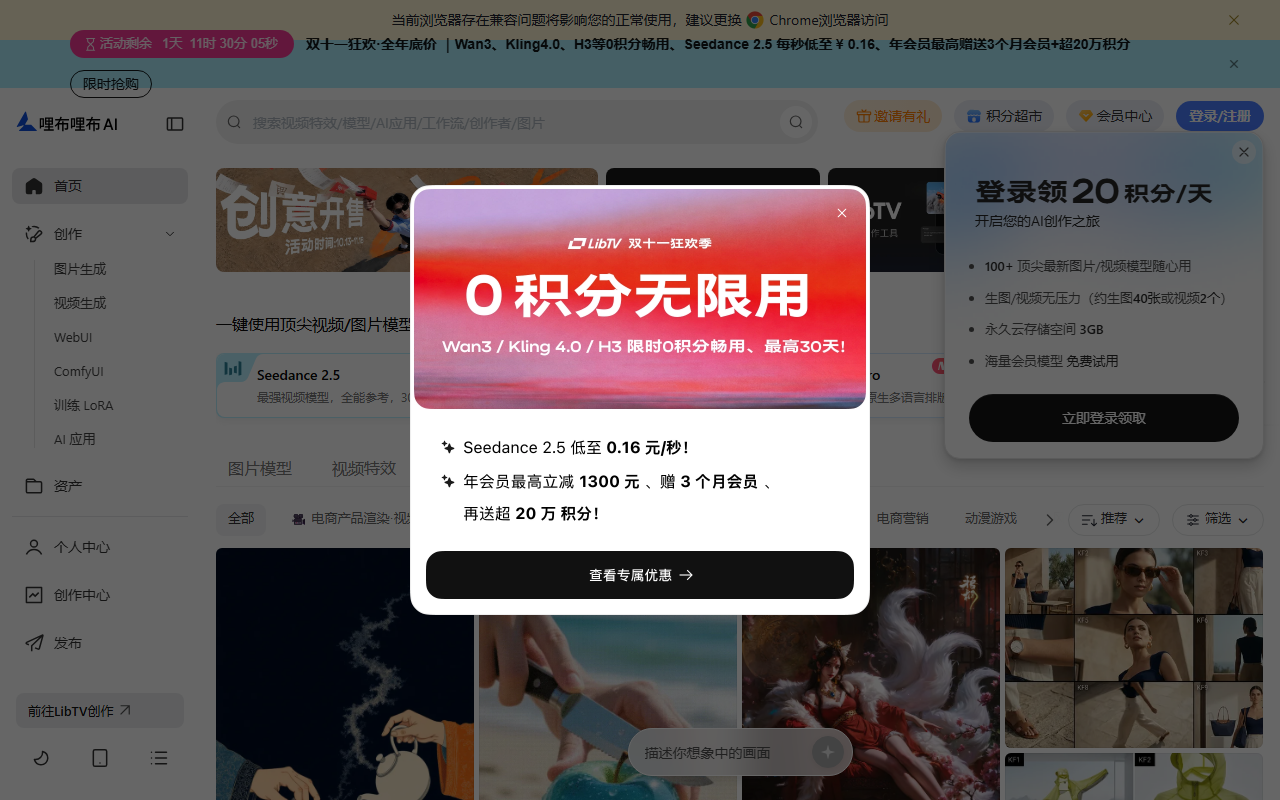
LiblibAI: one platform for image generation, video and LoRA training
LiblibAI is a Chinese one-stop AI creation platform that gathers image generation, video generation, inspiration browsing, ready-made AI apps and model training into a single interface. Version 2.0 focuses on shortening the path from a reference you like to a finished asset you can actually use.
The usual creative workflow is fragmented: references on one site, image generation on another, video elsewhere, and model training back on a local machine with a hand-built environment. LiblibAI tries to run the whole chain under one account, so images and video share the same assets and a trained LoRA returns directly to the generation page.
Built-in image models include Qwen-Image and Seedream 4.0; video models include Hailuo 2.0 and Tongyi Wanxiang 2.5. For newcomers that means not having to judge which model suits which shot, because common pairings already sit in the toolbox. Experienced users can still specify models and parameters one by one.
Main capabilities
Image generation
Several image models sit behind one panel, with Qwen-Image handling complex text prompts well, which helps when a scene, composition and on-image lettering all have to be described precisely. Results move straight into the editing panel instead of being exported and re-imported.
Video generation
Hailuo 2.0 and others support director-level camera control, so movement and pacing can be arranged shot by shot rather than prompted as a single sentence and left to chance.
Video effects
One-click effect templates package transitions, light treatments and stylisation as presets, which lowers the cost of finishing short videos and ad material.
Inspiration feed
More than 20,000 community works are collected in a feed, and a suitable one can be reproduced with one click, turning a reference into a usable starting point.
Quick creation apps
Over 6,000 packaged AI apps cover concrete scenarios such as avatars, posters, product shots and portrait sets, so users do not have to begin from a blank prompt.
Personal LoRA training
Upload your own images to train a dedicated LoRA. Preset modes and automatic tagging remove the manual labelling step, and both training and deployment run in the cloud without a local GPU.
Image post-processing
Resolution adjustment, style transfer, colour tuning, smart upscaling and inpainting. Inpainting is the practical tool for fixing hands, changing an expression or swapping a background.
Community and licensing
Works and models can be shared, and the platform carries a chain for copyright protection and selling work, so a creator can go from showcase to transaction inside the site.
How to use it
- Register and sign in, then open the creation workspace. The free tier hands out a daily compute allowance, enough to walk through the flow first.
- Decide the goal and pick image, video or an existing app; when unsure, start from the inspiration feed and adapt a similar piece.
- Open the AI toolbox and choose a model. Image work can switch between Qwen-Image and Seedream 4.0, video work between Hailuo 2.0 and Tongyi Wanxiang 2.5.
- Fill in the prompt, style and aspect ratio, then submit. For complex scenes, run a small size first and scale up once the composition holds.
- Use the post-processing panel for upscaling, inpainting, colour and style adjustments until the frame matches the intent.
- Save the work, download it or share it to the community; when a style must stay consistent, train a LoRA on your own images and reuse it.
Pricing and membership tiers
- Free tier: a daily allowance of free compute for generating images or video, enough to try the newest features.
- Image plans, basic: 36 yuan per month or 299 per year, with 15,000 compute points a month, 20 GB storage, commercial-safe models and basic editing.
- Image plans, professional: 63 yuan per month or 598 per year, 35,000 points, 50 GB storage, advanced editing and XL model training.
- Image plans, master: 159 yuan per month or 1,600 per year, 90,000 points, 130 GB storage, all advanced features and parallel tasks.
- Training plan: 55 yuan per month or 539 per year, 15,000 points, 80 GB storage, acceleration and a task queue.
- Training plan, advanced: 199 yuan per month or 1,799 per year, 50,000 points, 200 GB storage, more acceleration and more queues.
Who it suits
- Illustrators and concept designers who need fast style exploration, batch drafts and inpainting for detail work.
- E-commerce and advertising teams that want product shots, posters and short video material produced in one place instead of moved between tools.
- Independent creators who use the inspiration feed for references and one-click effects for packaging, saving time for the idea rather than the software.
- Game and film pre-production teams iterating on characters, environments and storyboards to cut communication costs.
- Individuals who want a personal style model but have no local GPU, since cloud training and deployment remove the environment setup.
Limits to know before starting
- How compute points convert into actual generations: not disclosed, and consumption varies widely by model, resolution and duration, so budget by trial.
- The exact licence scope of the models labelled commercial-safe, the permitted scenarios and any attribution requirement: not disclosed, so confirm per project before commercial use.
- Ownership of trained LoRAs and generated works, and the boundary of the platform's own usage rights: not disclosed.
- Maximum video length, resolution ceiling and number of queued tasks beyond the parallel-task note on the master tier: not disclosed.
- The exact daily compute allowance for free accounts and when it refreshes: not disclosed.
- Third-party models and apps are numerous, and the same prompt behaves very differently across them, so pick per task instead of defaulting to the first option.
- Features ship quickly and prices can change, so check the live page inside the platform before paying.
FAQ
How is this different from a plain AI art tool?
An art tool usually covers only the image step. LiblibAI puts image, video, references, packaged apps and training under one account, and a trained model returns straight to the generation flow, which removes repeated export and import on longer projects.
Can I use it without writing prompts?
Yes. The inspiration feed offers more than 20,000 works to reproduce in one click, and the quick-creation section packages over 6,000 apps by scenario, from avatars to posters and product shots, so editing an existing setup is easier than starting blank.
Do I need my own GPU to train a LoRA?
No. Training and deployment both run on the platform's cloud; upload images, choose a preset mode and the automatic tagging handles labelling. Compute consumption follows your membership tier.
Can the output be used commercially?
The platform offers models labelled commercial-safe and matching tiers, but the exact scope, permitted scenarios and attribution terms are not disclosed in the source, so verify per project before commercial release.

Frequently asked questions
How is this different from a plain AI art tool?
An art tool usually covers only the image step. LiblibAI puts image, video, references, packaged apps and training under one account, and a trained model returns straight to the generation flow, which removes repeated export and import on longer projects.
Can I use it without writing prompts?
Yes. The inspiration feed offers more than 20,000 works to reproduce in one click, and the quick-creation section packages over 6,000 apps by scenario, from avatars to posters and product shots, so editing an existing setup is easier than starting blank.
Do I need my own GPU to train a LoRA?
No. Training and deployment both run on the platform's cloud; upload images, choose a preset mode and the automatic tagging handles labelling. Compute consumption follows your membership tier.
Can the output be used commercially?
The platform offers models labelled commercial-safe and matching tiers, but the exact scope, permitted scenarios and attribution terms are not disclosed in the source, so verify per project before commercial release.



