
flomo suits people who want to keep recording thoughts with as little friction as possible: capture notes by typing, voice or WeChat, organise them with tags, and let AI find links between notes, analyse them in depth and retrieve past notes through natural-language questions.
flomo: A Minimalist Note-Taking App with AI Assistance
flomo is a note-taking app built around effortless recording with AI assistance. Its approach is to lower the barrier to writing things down: you capture an idea, a thought or an event the way you would post a short status update, and the AI takes care of the connections, reviews and statistics afterwards. For anyone who wants to keep accumulating ideas without being disturbed by a complex editor, the deal is simple: write it down first, then let the notes grow into a system on their own.
Main features
Quick capture The interface is clean and easy to operate, so you can record passing thoughts, ideas and events as easily as posting to a social feed, catching the trace of your thinking at any moment.
Minimal input It focuses on the act of recording itself and removes complex editing features, so you can type quickly without being distracted by formatting and stay focused on thinking and expressing.
AI voice transcription AI turns spoken input into text in real time, which helps in situations where typing is inconvenient, such as driving or walking.
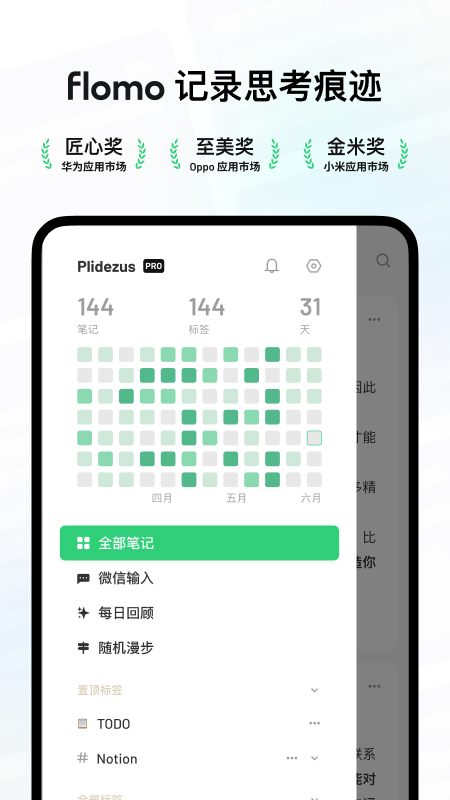
WeChat input You can send content directly through WeChat and record whenever and wherever you are, lowering the barrier to taking notes even further.
Related notes The AI finds hidden links between notes and weaves seemingly scattered thoughts into a knowledge network, helping you sort out and understand your own knowledge system.
AI insights It analyses your notes in depth, identifies core themes, reveals blind spots in your thinking, and raises sharp questions that guide you to think further.
Search by asking You ask questions in natural language and the AI digs relevant answers and inspiration out of your past notes, like an intelligent assistant that speeds up information retrieval.
Random walk It presents your thinking map visually, letting you explore the structure of your knowledge, discover unexpected connections and spark new ideas.
Daily review Push notifications and widgets remind you to revisit past notes, helping you strengthen memory and find value in what you recorded.
Quantified statistics It tracks the number of notes, word counts and other data, so you can see your own growth trajectory and stay motivated to keep recording.
Tag system You can build your own tag structure to classify and organise notes, making later search and review easier.
How to use
- Start a note: open the app and write down whatever is on your mind; there is no need to plan a structure or layout first.
- Add tags: give the note one or two tags and gradually build up your own classification system.
- Switch input method when typing is hard: dictate with AI voice transcription, or send the content through WeChat.
- Review and retrieve: when you need something old, ask in natural language with Search by asking, or check Related notes to find links.
- Let it remind you: turn on daily review notifications and widgets to revisit older notes regularly.
- Watch the numbers: use the quantified statistics to follow how your note count and word count change over time.
Who it is for
- Capturing ideas and thoughts quickly, before they slip away
- Recording key points after reading, classes or meetings
- Building a personal knowledge system and tag structure over the long term
- Review-style learning and memory reinforcement through daily review
- Finding topics and creative links between notes via random walk and related notes
Limitations
- The available material does not describe pricing, supported platform versions, or how data export and synchronisation work; check the official channels for those details.
- The AI features (related notes, AI insights, search by asking) build on the notes you already have, so the number and quality of your notes affect the results.
- Minimal input means it is not aimed at complex layout or long-form formatting; consider other tools for heavily formatted writing.
Frequently asked questions
Who is flomo for?
It suits people who want to keep recording ideas, inspirations and study notes without being disturbed by a complex editor, and who want to build a personal knowledge system step by step through tags, daily review and quantified statistics.
How is it different from an ordinary note-taking app?
It keeps input minimal and removes complex editing features so recording comes first. The AI then handles the organising: finding hidden links between notes, analysing core themes in depth, retrieving past notes with natural-language questions, and showing a visual thinking map through random walk.
How can I record when typing is inconvenient?
You can use AI voice transcription to turn spoken input into text in real time, which helps while driving or walking, or send content directly through WeChat to record it wherever you are.



