

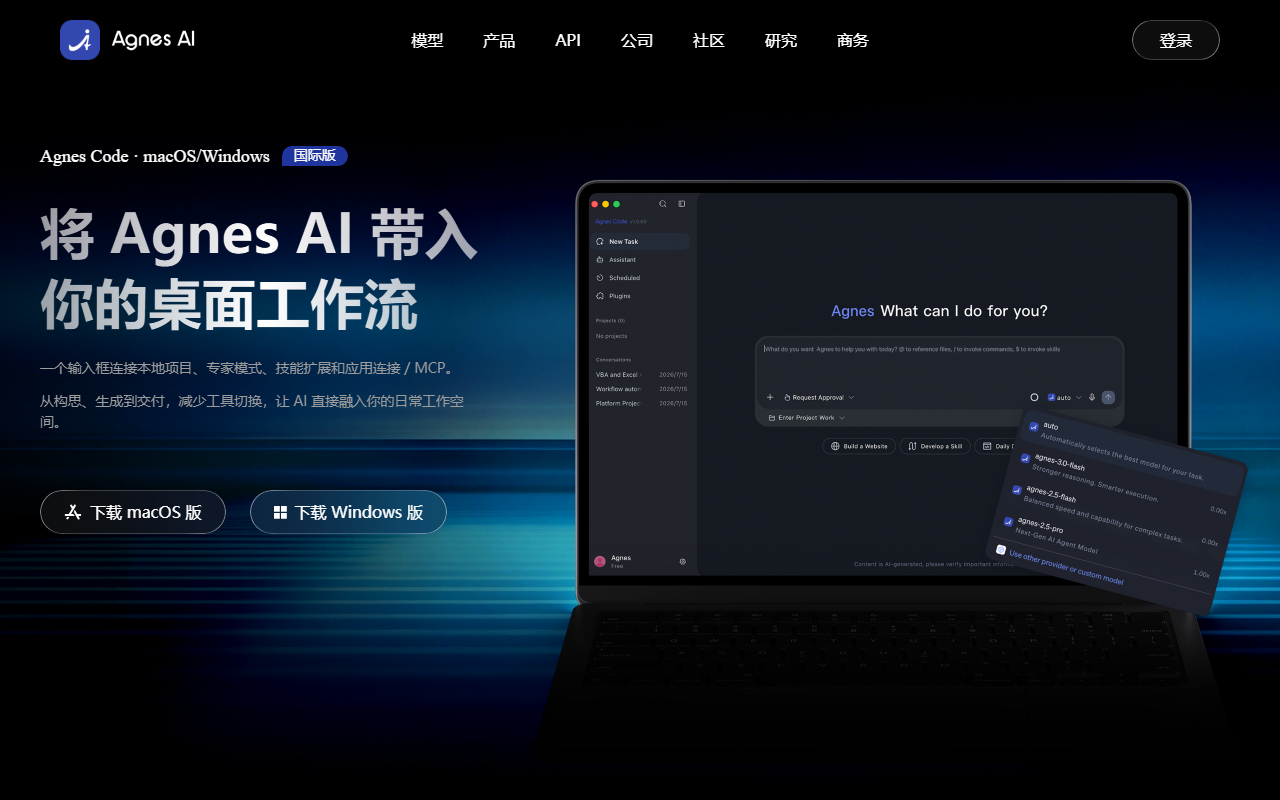
AgnesCode is a desktop AI coding workbench developed by Agnes AI, supporting Mac and Windows. It uses a single natural-language input box to connect local project spaces, multi-model routing, Skills capability packaging, and MCP app connections, letting AI integrate directly into the daily development environment across the full workflow from requirement input to delivery of code, documents, and multimedia artifacts.
Quick Answer
AgnesCode is a desktop AI coding workbench developed by Agnes AI (supporting Mac and Windows). Through a single input box, it connects local projects, multi-model routing, and tool extensions, and provides Smart/Expert dual modes, Skills capability packaging, and MCP app connections, covering the full workflow from requirement input to deliverable output.
Product Positioning
AgnesCode is positioned as a desktop workbench that “brings AI directly into the daily development environment,” rather than a standalone chat window. It targets developers and teams who need to connect requirement description, code generation, tool invocation, and artifact management into a single flow:
- Runs on the local desktop, supporting Mac and Windows;
- Uses a natural-language input box as the unified entry point, reducing switching between tools;
- Organizes context and artifacts by project, so generated results are not scattered across ad-hoc chat sessions;
- The account system is integrated with the Agnes web version, with subscriptions and credits kept consistent.
Core Features
Single Input Box Interaction
Start tasks through a natural-language input box. The system automatically understands the request, breaks it into steps, and invokes the appropriate tools, so users do not need to manually orchestrate the workflow.
Smart/Expert Dual Modes
- Smart Mode: automatically selects the optimal execution path, suitable for completing routine tasks quickly;
- Expert Mode: opens deep control over models, parameters, tools, and context, suitable for scenarios with fine-grained requirements for the generation process.
Local Project Spaces
Folders, context, and generated artifacts are organized independently by project, so the inputs and outputs of each task are stored in the corresponding project space, making them easy to trace and continue developing.
Multi-Model Routing
Supports free switching between Agnes’s own models and external models, with automatic routing that balances generation quality, response speed, and invocation cost.
Skills Capability Extension
Packages standard operating procedures, industry knowledge, and toolchains into reusable capability packs that Agnes automatically recognizes and schedules for execution, turning repetitive processes into team assets.
App Connect / MCP
Connects browsers, design tools, documents, spreadsheets, and internal systems through App Connect, making the desktop app a unified entry point for operations.
Centralized Artifact Management
Deliverables such as code, images, videos, and documents are archived in a unified way in the project space, with support for continued editing, downloading, and sharing.
How to Use AgnesCode
- Download and install: Visit the AgnesCode official website https://agnes-ai.com/agnescode, download the version for your operating system, and complete the installation;
- Log in: Sign in with your Agnes account; subscriptions and credits remain consistent with the web version;
- Authorize a directory: On first launch, select a local workspace and grant access to your project folder;
- Enter your requirement: Describe the development task in natural language in the input box; the system automatically breaks it down and invokes tools;
- Choose a mode: Smart Mode executes automatically; Expert Mode lets you manually switch models and adjust parameters and context;
- Review artifacts: Code, documents, and multimedia artifacts are automatically archived in the project space, with support for continued editing and sharing.
Use Cases
- Everyday coding: Describe requirements in the input box to automatically generate code snippets, function implementations, and unit tests, reducing manual writing;
- Bug fixing: Import an existing project, describe the abnormal symptom, and the model quickly locates the root cause and generates a fix patch that can be verified locally;
- Cross-file refactoring: Coordinate interface and call-logic changes across a dozen or more interdependent files while keeping the project structure consistent;
- Prototype development: Build a runnable web app or tool from scratch; artifacts are automatically archived in the project space and can be verified with a double-click;
- Team collaboration: Share project context and deliverables through a unified account system, keeping multi-developer environments consistent.
Strengths
- The dual-mode design balances “out-of-the-box” convenience and “deep control,” covering users with different skill levels;
- Multi-model routing automatically weighs quality, speed, and cost, reducing manual model-selection overhead;
- Skills capability packs make standard workflows and industry knowledge reusable and accumulable;
- MCP-based ecosystem connections bring browsers, design tools, documents, and internal systems into one entry point;
- Security and control: sensitive operations require up-front confirmation, local project access is strictly scoped, and key changes retain a complete audit trail.
Limitations
- Only Mac and Windows desktop versions are available; no other platform support is mentioned, so Linux users should watch the official website for future updates;
- The actual effectiveness of multi-model routing, Skills, and MCP connections depends on configuration and the degree of ecosystem integration; it is recommended to run a small-scale trial in a real project first;
- Public pages do not provide full details on specific subscription tiers, credit allowances, and billing rules; the official website is the authority.
Pricing Verification Note
Pricing, subscription tiers, credit allowances, and feature availability are volatile information that may change with versions and operating strategy. This article does not state specific prices. Before making a decision, visit the AgnesCode official website https://agnes-ai.com/agnescode to verify the latest subscription plans, free allowances, and platform support.
Similar Tools and Alternatives
When selecting an AI coding tool, you can evaluate AgnesCode alongside other AI coding platforms. For example, NetEase Zhiqi (网易智企) has launched an enterprise-grade, controllable AI coding platform that can serve as a reference in the same category. When comparing, consider: local project permissions and audit capabilities, model-routing flexibility, artifact management, team collaboration mechanisms, and enterprise governance requirements, then make a final decision based on official website information.
Official Website and Primary Sources
- AgnesCode official website (product overview and download): https://agnes-ai.com/agnescode
- Official page title: Agnes Code - Free AI Coding Tool & AI Code Assistant (published by agnes-ai.com)
Use the official website and official documentation as the final source of information, especially for download versions, system requirements, and pricing policies.
Frequently asked questions
Which operating systems does AgnesCode support?
AgnesCode is a desktop application that currently supports Mac and Windows. You can download the corresponding version from the official website https://agnes-ai.com/agnescode.
What is the difference between Smart Mode and Expert Mode in AgnesCode?
Smart Mode automatically selects the optimal execution path, suitable for completing tasks quickly; Expert Mode opens deep control over models, parameters, tools, and context, suitable for users who need fine-grained intervention in the generation process.
How are AgnesCode subscriptions and credits calculated?
AgnesCode uses your Agnes account to log in, and subscriptions and credits remain consistent with the web version. Specific tiers, allowances, and billing rules are volatile information; refer to the latest official website information.
How does AgnesCode protect the security of local projects?
The product uses an up-front confirmation mechanism for sensitive operations, strictly scopes local project access, and retains a complete audit trail for key changes. On first launch, the user must explicitly grant access to the project folder.
Where are the code and files generated by AgnesCode stored?
Artifacts such as code, images, videos, and documents are archived in the corresponding local project space, with support for continued editing, downloading, and sharing; they are not scattered across ad-hoc chat sessions.



