Yuque is a document and knowledge-base tool: capture ideas as short notes, write formal documents in a first-party editor, and organise everything into knowledge bases with a browsable outline. It also supports writing in conversation with DeepSeek R1 and filing that conversation into a knowledge base as a note or document.
Yuque: a writing tool that turns notes into a knowledge base
Yuque is a document, note-taking and knowledge-base tool built around one idea: keep quick capture and long-term accumulation on the same chain. An idea lands in a short note first, becomes a document when it needs structure, and settles into a knowledge base that is organised by table of contents like a book or a wiki.
It serves two kinds of users at once. Individuals use it for reading notes, project material and long-term records; teams use it for internal docs, process manuals and public knowledge sites. The materials mention a first-party editor, sync across devices with no device limit, and financial-grade encryption with multiple backups.
What it does
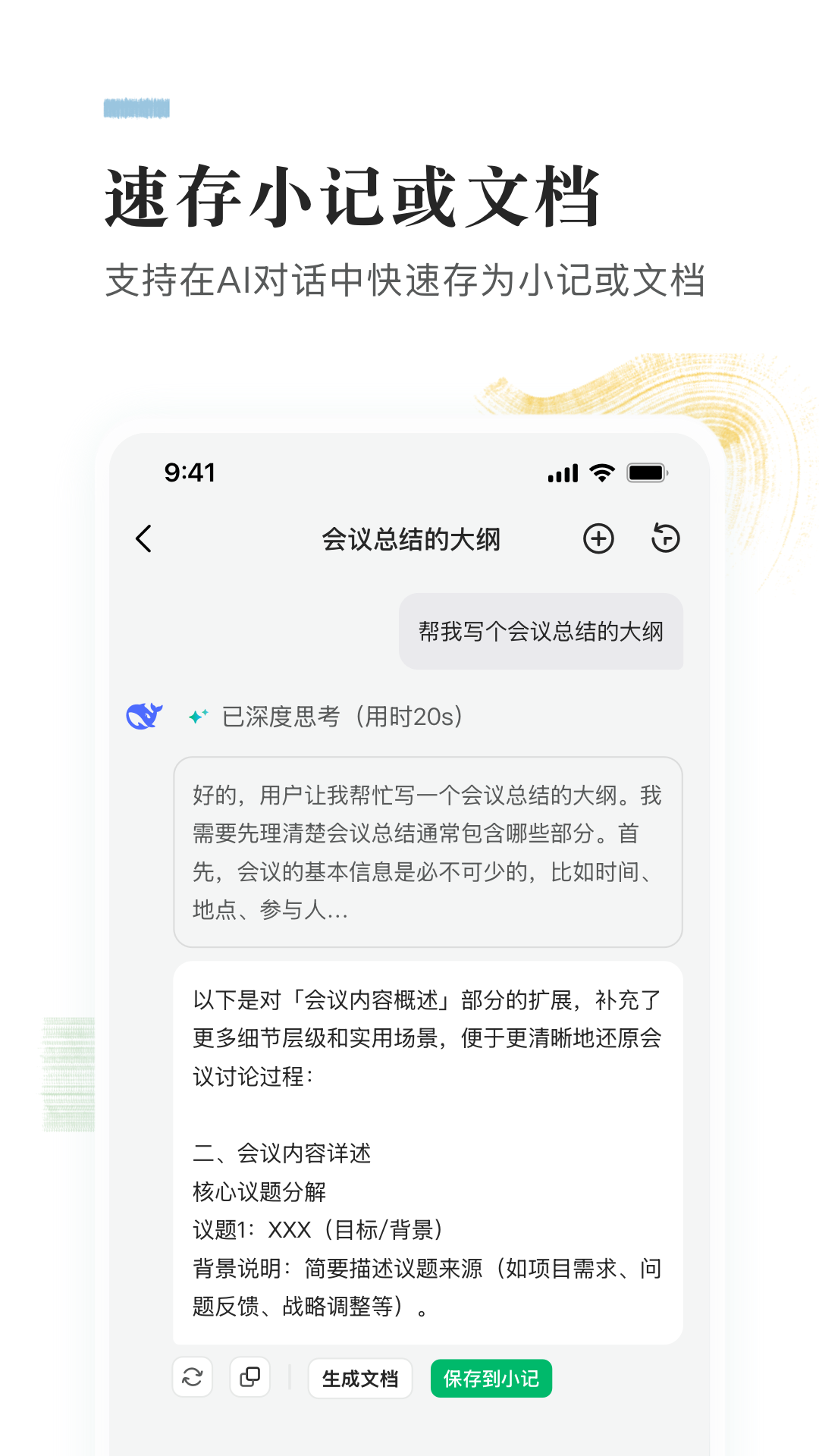
- AI-assisted writing. You can write while chatting. The materials name DeepSeek R1 as the model, and any conversation can be turned into a note or a document and filed straight into a knowledge base, so nothing has to be copied over by hand.
- Capture anywhere. Short notes work as a pocket notebook: ideas, inspirations and to-dos go in first, and you decide later whether any of them deserves a full document.
- Sync across devices. Phone, desktop, web and tablet stay in step, with no cap on the number of devices, so switching machines does not mean reorganising your material.
- A first-party editor. The writing experience is the selling point here, described in the materials as natural and comfortable. Specific formatting features are not detailed in the material.
- Structured knowledge base. Scattered documents are gathered into a table of contents you can browse like a book, and the same structure doubles as a team wiki.
- Data protection. Financial-grade encryption plus multiple backups is the security claim the materials make.
From one idea to a knowledge base
- Install the app on phone or desktop and sign in with the same account. Sync only works when the account matches.
- When an idea arrives, put it into a short note. Do not create a document yet; the cheaper the capture, the easier it is to keep doing.
- Once a note grows long enough to need structure, convert it into a document, add a title, split it into sections and build an outline.
- Create one knowledge base per long-running topic and order its documents by outline, rather than piling everything into one folder.
- When using the AI chat, state the context first - topic, audience, desired length - then convert the result into a document. It gives a first draft; the judgement is still yours.
- Prune regularly: archive or label outdated documents. A knowledge base that turns into a dumping ground stops being read.
Where it fits
- Personal knowledge management: reading notes, course notes, tracking one field over years.
- Team documentation: onboarding handbooks, process standards, product specs, so nobody has to explain the same thing verbally again.
- Project memory: requirements, decisions and retrospectives in one place, so material survives staff changes.
- Public knowledge sites: turning public documents into a browsable site.
- Writing: from first draft to finished piece inside one tool.
Limits worth knowing
- The materials give no official website or pricing, so what is free and what a membership includes has to be checked against the current official description.
- No device limit and financial-grade encryption are the materials' wording; the encryption method, backup frequency and recovery process are not described. Where these are hard requirements, confirm with the vendor.
- AI writing depends on a specific model, and the materials name only DeepSeek R1. Model versions, availability and quotas can all change.
- The AI produces drafts. Facts, figures and citations still need checking, especially for anything published externally.
- Structure is maintained by people. Messy outlines and duplicate documents are not something the tool will fix for you.
- The materials do not cover export formats, API access, per-file size limits or fine-grained collaboration permissions; confirm before wiring it into an existing workflow.
Frequently asked questions
Is Yuque for individuals or teams?
Both. Individuals use short notes plus knowledge bases for long-term accumulation; teams use shared knowledge bases for internal docs and standards. The materials do not separate personal and team feature sets.
What is the difference between a note and a document?
Notes are for quick capture at low cost, good for catching ideas; documents have a title and structure, good for handing to someone else. The flow the materials describe is content first arising in chat or notes, then becoming a document.
Does syncing across devices cost extra?
The materials only state that the number of synced devices is unlimited. They do not say whether membership is required, and give no pricing. Check the official description.
Can AI output be used as is?
Not advisable. It is a first draft; facts, numbers and citations need verifying, and anything published externally should pass a human edit.
How secure is the data?
The materials claim financial-grade encryption and multiple backups, but do not disclose the algorithm, backup interval or disaster recovery plan. For strict compliance, ask the vendor directly.
Frequently asked questions
Is Yuque for individuals or teams?
Both. Individuals use short notes plus knowledge bases for long-term accumulation; teams use shared knowledge bases for internal docs and standards. The materials do not separate personal and team feature sets.
What is the difference between a note and a document?
Notes are for quick capture at low cost, good for catching ideas; documents have a title and structure, good for handing to someone else. The flow the materials describe is content first arising in chat or notes, then becoming a document.
Does syncing across devices cost extra?
The materials only state that the number of synced devices is unlimited. They do not say whether membership is required, and give no pricing. Check the official description.
Can AI output be used as is?
Not advisable. It is a first draft; facts, numbers and citations need verifying, and anything published externally should pass a human edit.
How secure is the data?
The materials claim financial-grade encryption and multiple backups, but do not disclose the algorithm, backup interval or disaster recovery plan. For strict compliance, ask the vendor directly.