
Xinliu AI Assistant is an AI search helper app. It looks up information online, reads and summarises documents and web pages, and helps draft paper outlines, marketing copy, research reports and periodic reports.
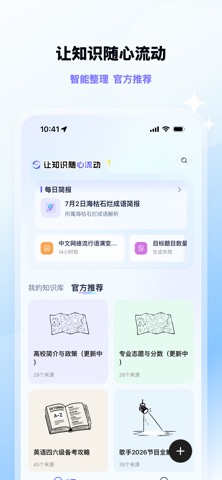
What is Xinliu AI Assistant
Xinliu AI Assistant is an AI search helper from Alibaba built around three kinds of work: finding information, reading documents and writing content. It searches the web for live information and gives a fairly detailed answer, showing the sources so you can go back to the original text. It also parses uploaded files and web pages quickly, produces summaries and offers translation and Q&A. On top of that it supports assisted writing, such as outlining a paper, drafting marketing copy, preparing industry research reports and writing weekly or monthly reports. The product targets academic researchers, university students and internet professionals who search and organise information frequently.
Main capabilities
- Smart search: Retrieves live information online and answers in detail, suited to factual and time sensitive questions.
- Source attribution: Provides the sources behind an answer so you can revisit the original text and explore further.
- File and web page parsing: Parses uploaded files and web pages quickly, helping with papers, financial reports and other documents.
- Summaries, translation and Q&A: Generates summaries of parsed content and offers translation and Q&A, lowering the cost of reading long documents.
- Assisted writing: Used for outlining papers, writing marketing copy, industry research reports and weekly or monthly reports.
How to use Xinliu AI Assistant
- Clarify the task type: decide whether you are searching for facts, reading a document or writing something, then pick the matching entry point.
- Search online and check sources: phrase the question precisely, look at the sources given with the answer, and open the original when needed.
- Upload or paste material: hand over a paper, financial report or web page and let the assistant generate a summary and key points first.
- Ask follow-up questions: keep asking about parts of the summary you do not understand, using translation and Q&A to fill the gaps.
- Draft then revise by hand: when you need finished text, let it outline a paper or draft copy, then check the facts and adjust the wording yourself.
Use cases
- Academic research: find material, read literature quickly and outline reviews or papers.
- Study and coursework: look up concepts, translate foreign material and keep asking about difficult points.
- Workplace documents: draft weekly and monthly reports, industry research reports and presentation material.
- Marketing and operations: collect topic ideas and write marketing copy and promotional content.
Limitations and notes
- Supported platforms, account requirements and pricing are not stated in the available material, so confirm them before use.
- AI answers may contain factual errors, so check key data, names and dates against the original source.
- Paper citations and financial figures should follow the original documents, not the generated summary.
- Before uploading files with sensitive or confidential content, confirm the compliance requirements.
Frequently asked questions
Who is Xinliu AI Assistant for?
It suits academic researchers, university students and internet professionals who frequently search for material, read documents and produce content.
How is it different from a general AI chat tool?
It organises smart search, document reading and writing support together: answers come with sources, and it can parse files and web pages into summaries with translation and Q&A.
Can the search results be cited directly?
Not recommended. Go back to the original through the cited sources, verify the wording and data, then decide whether to cite it.
Frequently asked questions
Who is Xinliu AI Assistant for?
It suits academic researchers, university students and internet professionals who frequently search for material, read documents and produce content.
How is it different from a general AI chat tool?
It organises smart search, document reading and writing support together: answers come with sources, and it can parse files and web pages into summaries with translation and Q&A.
Can the search results be cited directly?
Not recommended. Go back to the original through the cited sources, verify the wording and data, then decide whether to cite it.