

Snipd is an AI podcast player that generates transcripts and summaries with AI, lets you save thoughts with one tap, offers chapter navigation and search, and syncs to knowledge tools such as Notion.
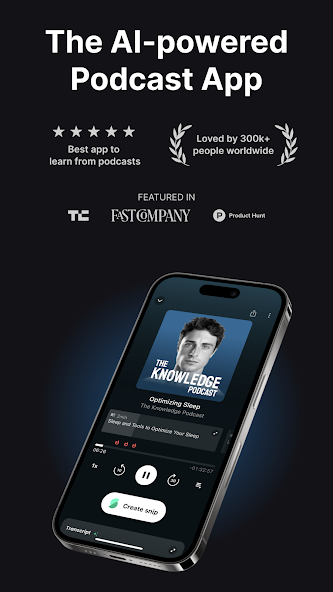
Snipd: An AI Podcast Player That Saves the Ideas Worth Keeping
What Snipd is
Snipd is an AI podcast player app. It generates transcripts and summaries with AI, so you can decide whether an episode deserves your time and grasp the key points while listening. When something matters, one tap saves the thought, and you later receive a personalised recap email with the highlights, which can also be synced to knowledge tools such as Notion.
Beyond playback, Snipd adds animated real-time captions, chapter navigation, search and detailed guest profiles. A newer video clip feature pulls short segments from popular podcasts so they are easy to share.
Main features
- AI transcripts and summaries — Turns episodes into transcripts in real time and offers a concise summary, so you can take in the core points in a spare moment instead of listening end to end.
- One-tap saving and review — Save the moment and your thought with a single tap, then revisit the highlights later through email, turning something you merely heard into material you can build on.
- Personal content management — Syncs with knowledge tools such as Notion and Readwise, channelling what you gain from podcasts straight into your personal library instead of copying it by hand.
- Smart navigation and search — Animated real-time captions, AI-generated chapters and search let you jump straight back to a point you want to hear again, without dragging the progress bar.
- Guest profiles — Shows each guest's name, bio and photo and suggests other episodes featuring the same person, so you can keep following people you like.
- Video clip sharing — Pulls clips of roughly two to five minutes from popular podcasts and makes them easy to share on chat and social platforms.
Who it suits
- People who listen while commuting or exercising and forget most of it afterwards.
- Creators and researchers who need to turn podcasts into notes and a knowledge base.
- Anyone who wants to judge whether an episode is worth a full listen before committing.
- People who like sharing a striking quote or exchange with friends or colleagues.
How to use it
- Install Snipd and subscribe to the shows you follow.
- Open an episode and skim the AI summary and transcript to decide if it deserves a full listen.
- Turn on live captions while playing and use chapter navigation to jump to what interests you.
- Tap once when you hear something worth keeping to save that moment and your thought.
- Sync what you saved to tools such as Notion or Readwise.
- Check the personalised recap email, or use the video clip feature to cut and share a segment.
Limits and advice
- Transcripts and summaries are AI-generated; proper nouns, accents or multi-speaker exchanges can trip them up, so verify against the audio before quoting.
- Video clips and sharing depend on whether the podcast offers video, and not every show supports it.
- Syncing with third-party tools requires account authorisation, so check the data scope and privacy settings.
- Features, platforms and pricing follow the current version of the app and may change with updates.
FAQ
How is Snipd different from an ordinary podcast player?
Beyond playback it adds AI transcripts and summaries, one-tap clip saving, live captions and chapter navigation, and syncs to tools like Notion and Readwise, which suits listening while building up knowledge.
Where do saved clips go?
Clips and thoughts are kept in the app, can be revisited through the personalised recap email, and can be synced to knowledge tools such as Notion and Readwise.
Which third-party tools can it sync with?
Notion and Readwise are among the knowledge tools mentioned; the exact list depends on the sync settings inside the app.
How does the video clip feature work?
It extracts clips of roughly two to five minutes from popular podcasts for sharing on chat or social platforms; availability depends on whether that show provides video.
Are the transcripts accurate?
AI transcripts are generally usable, but proper nouns, accents and multi-speaker passages can cause errors, so check the original audio for important quotes.
Frequently asked questions
How is Snipd different from an ordinary podcast player?
Beyond playback it adds AI transcripts and summaries, one-tap clip saving, live captions and chapter navigation, and syncs to tools like Notion and Readwise, which suits listening while building up knowledge.
Where do saved clips go?
Clips and thoughts are kept in the app, can be revisited through the personalised recap email, and can be synced to knowledge tools such as Notion and Readwise.
Which third-party tools can it sync with?
Notion and Readwise are among the knowledge tools mentioned; the exact list depends on the sync settings inside the app.
How does the video clip feature work?
It extracts clips of roughly two to five minutes from popular podcasts for sharing on chat or social platforms; availability depends on whether that show provides video.
Are the transcripts accurate?
AI transcripts are generally usable, but proper nouns, accents and multi-speaker passages can cause errors, so check the original audio for important quotes.



