Seekee is an AI web assistant for Apple devices: AI-arranged search results, in-page summarization, translation and text generation, plus one-tap saving to a private cloud drive. A free tier covers the basics, while Premium adds advanced tools, more storage and faster speed.
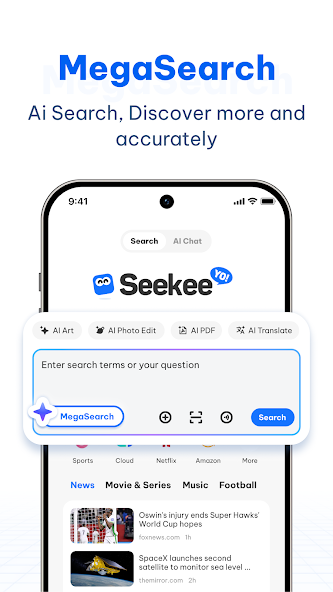
Seekee: an AI web assistant that merges AI search, page summaries and cloud saving into one browser
Seekee is an AI-powered web assistant app. It does not present itself as just another browser, but as a single entry point for browsing, asking and organizing: AI shapes the search results, a built-in toolkit reads the page for you, and one-tap cloud saving turns temporary reading into a searchable archive. The official description calls it a smart portal for exploring, discovering and organizing the web.
The problem Seekee targets is the two slowest parts of browsing: finding information and then reading it. A classic search engine hands back ten links and leaves the judgement to you. Seekee puts AI into the result selection step, then keeps summarization, translation and text generation inside the page, so you no longer have to finish a paragraph before deciding whether it was worth opening.
On devices, the official listing covers iOS, iPadOS and macOS, which means the product is built around Apple hardware on both mobile and desktop. Multiple interface languages are supported, and the pitch emphasizes fast, stable, ad-free operation. For people who move between a phone and a Mac with the same research task, that consistency is the practical advantage.
Everything below comes from the public product description. No undisclosed pricing, model version or internal technical detail has been added, and capabilities should be checked against the current release.
What Seekee actually does
AI search that organizes before it answers
Instead of forwarding keywords to an engine and returning a list, Seekee has AI take part in filtering and grouping the results, described officially as fast, personalized and precise. The difference shows up on vague questions: you can describe the outcome you want in one sentence and let the assistant judge which sources match the intent, rather than splitting the task into four keyword variants. For comparison shopping or hunting a specific clause, that removes a lot of paging.
A built-in AI toolkit that works inside the page
This is where Seekee separates itself from a standard browser. Four capabilities are listed: summarizing page content, answering questions about the page, translating text, and generating text. The shared premise is that you never leave the page, so you do not copy body text into another chat window or open a second tab just to read a foreign paragraph. Summary first, translation in place, then a draft reply based on what the page says.
One-tap cloud saving
Seekee includes a private cloud drive where articles, documents and links can be stored immediately. The design addresses the familiar failure of having read something and being unable to find it again: pages get redesigned, posts get deleted, links rot, and browser history rarely preserves why a source mattered. Keeping the key passage together with its origin gives each research session a traceable record, and reducing saving to a single tap lowers the cost of tidying up.
Premium as a capacity tier, not a paywall on basics
The Premium tier is documented as unlocking more advanced tools, larger storage, faster speed and exclusive AI features for advanced users. The useful detail is the structure: search, summary, translation and cloud saving stay available on the free tier, while payment buys quota, speed and extra tools rather than the core workflow. Light users can therefore validate the product before subscribing.
No ads, many languages
Fast, safe, stable and ad-free is presented as a standalone selling point, which suggests a clean result page is treated as part of the product value. Result pages crowded with ads and aggregator sites are a common reason people give up on mobile browsing, and removing that layer shortens the path to the source. Multi-language support lets the same habits carry over to foreign material.
From install to a working archive in four steps
- Install Seekee on an iPhone, iPad or Mac and grant the network and storage permissions it asks for on first launch. Because the product is meant as a browsing entry point, making it the default browser avoids switching between apps.
- Ask in a full sentence. When you need material, describe the situation and the outcome instead of guessing keywords, for example asking for an official document with a citable clause number, and let AI search weigh source quality first.
- Once inside a page, use the toolkit: request a structured summary of a long report, translate a foreign section in place, ask for an explanation tied to the page. When a passage is worth keeping, save it immediately and add one line about why it mattered.
- Return to the cloud drive periodically to merge entries by project or topic and delete duplicates and dead links. Seekee keeps the material; turning it into reusable conclusions still depends on this step.
Pricing and membership
- Public information distinguishes only a free tier and a Seekee Premium membership. Subscription price, billing cycle and per-tier quotas are not disclosed in the source, so no figures are estimated here.
- Premium is documented as adding four things: more advanced tools, larger storage, faster speed and exclusive AI features. All four are felt mainly by heavy users, which makes the free tier a reasonable place to test the workflow.
- Whether to upgrade is better judged by how many items you save per month and how many pages you translate than by the feature list alone.
Who it fits
- Researchers, analysts and students who continue the same reading task across a phone and a Mac.
- Anyone who reads long foreign-language material and wants translation plus summary in place.
- Users tired of ad-heavy result pages and aggregator sites when checking facts, prices or contract terms.
- Writers and operators who already save useful content but lack one consistent place to file it.
Limits worth knowing first
- Narrow platform coverage: only iOS, iPadOS and macOS are documented. Android, Windows and a web version are not mentioned, so non-Apple users cannot test it fully.
- Thin official footprint: the source provides no confirmable product website, so pricing, model version and data handling cannot be verified further. Check the app store listing before subscribing.
- AI output needs human checking: summaries and answers are generated from page content, and legal, medical or financial decisions require going back to the original source line by line.
- Cloud saving is not permanent archiving: storage depends on the membership tier, and saved links can still break when the original page disappears, so keep a copy of important documents.
- No screenshots are used here: the source contains no confirmable official visuals, so none are shown rather than implying an interface that may not match.
Frequently asked questions
How is Seekee different from a normal browser?
A normal browser opens pages. Seekee also helps understand and organize them: AI takes part in selecting search results, the page itself can be summarized, translated or used to generate text, and content can be saved to a private cloud drive with one tap. The difference sits in what happens after you find something.
Do you have to pay to use it?
No. Search, the built-in AI tools and basic cloud saving work on the free tier. Premium adds more advanced tools, larger storage, faster speed and exclusive features. Prices are not disclosed in the source, so the in-app listing is authoritative.
Which devices are supported?
The official listing covers iOS, iPadOS and macOS, meaning iPhone, iPad and Mac. Android and Windows versions are not mentioned.
Can saved content be lost?
Content lives in a private cloud drive whose capacity depends on the membership tier. Saved links can still fail if the original page is removed, so keep a copy of the source for anything important.
Frequently asked questions
How is Seekee different from a normal browser?
A normal browser opens pages. Seekee also helps understand and organize them: AI takes part in selecting search results, the page itself can be summarized, translated or used to generate text, and content can be saved to a private cloud drive with one tap. The difference sits in what happens after you find something.
Do you have to pay to use it?
No. Search, the built-in AI tools and basic cloud saving work on the free tier. Premium adds more advanced tools, larger storage, faster speed and exclusive features. Prices are not disclosed in the source, so the in-app listing is authoritative.
Which devices are supported?
The official listing covers iOS, iPadOS and macOS, meaning iPhone, iPad and Mac. Android and Windows versions are not mentioned.
Can saved content be lost?
Content lives in a private cloud drive whose capacity depends on the membership tier. Saved links can still fail if the original page is removed, so keep a copy of the source for anything important.