

QwenWork is Alibaba's all-in-one AI workspace that turns natural-language requests into documents, slide decks, web pages, images and videos, and can also analyse business data, build e-commerce product pages and tidy up local folders.
Overview
QwenWork is Alibaba's all-in-one AI productivity platform, built for individual and business users outside mainland China. It gathers document, presentation, web page, image and video generation into a single workspace: you describe the task in plain language, or type "/" to call a Skill, and the platform carries the request from a rough idea to something you can hand over. It runs in the browser and as a desktop client, and it connects to collaboration tools such as Slack and Notion.
Compared with tools that generate one artefact at a time, QwenWork aims at the whole task. Instead of returning a paragraph of text, it breaks the request into steps, calls the capabilities it needs, and returns results you can keep editing or pass on to colleagues. The underlying model is Alibaba's own Qwen3.8-Max, a 2.4-trillion-parameter model, so reasoning and multimodal handling happen inside one stack. Chinese and English are supported now, with Spanish, Portuguese, Japanese and Korean announced as forthcoming.
Key features
- Multimodal generation: produce documents, slide decks, web pages, images and videos in one conversation, so assets no longer need to be shuttled between separate tools.
- Plain language and Skills: describe what you need in everyday words, or type "/" to find and invoke a specific Skill when a workflow should follow repeatable steps.
- Business data insight: consolidates day-to-day business data and surfaces key metrics, trends and suggested next actions in priority order, which helps teams decide what to do first.
- E-commerce content: one product photo is enough to build a product detail page with copy, visuals and layout, useful when listings have to be published in volume.
- Multimedia production: expands a short brief into a complete piece with script, visuals, voice-over, music and a finished video.
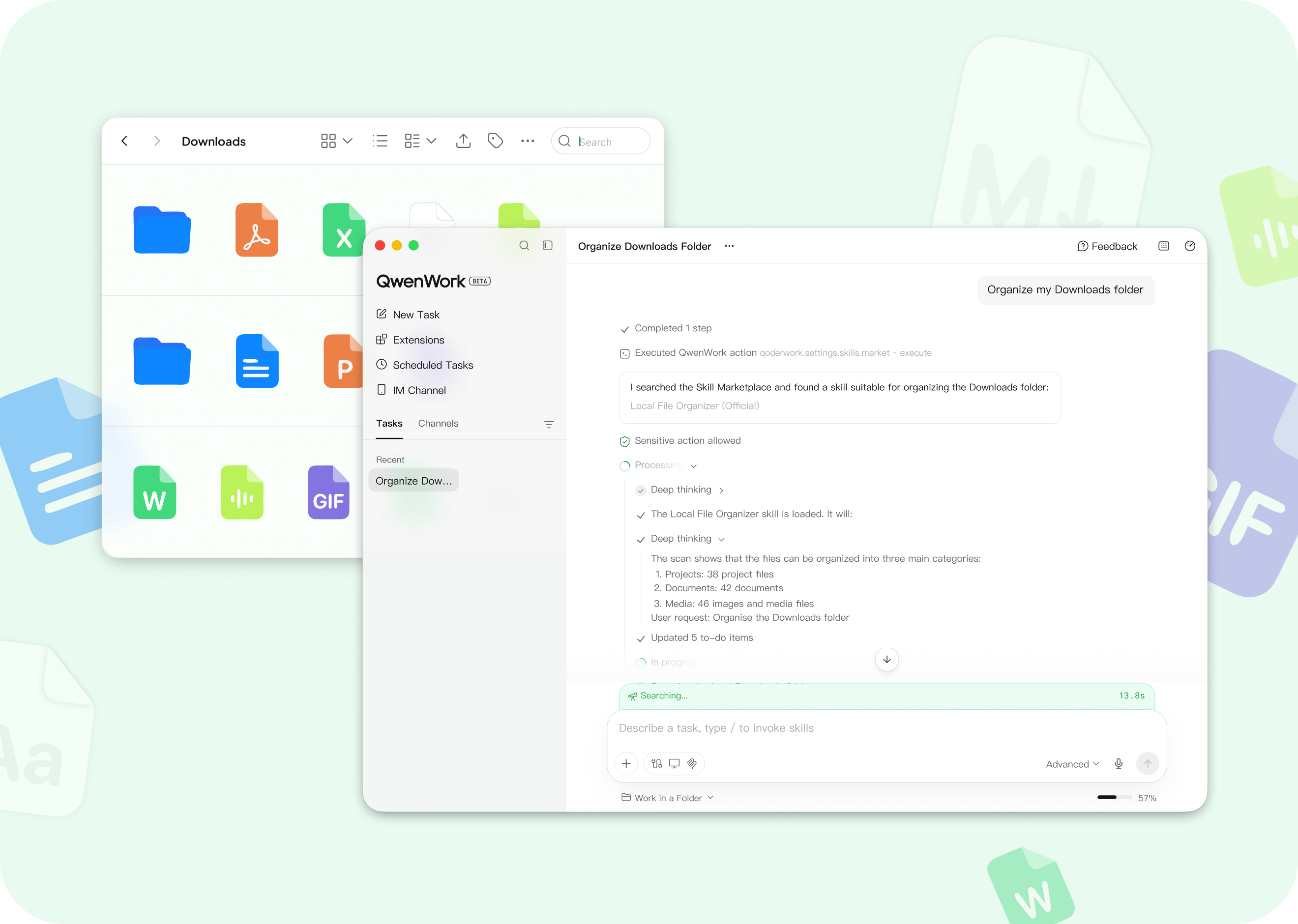
- Local file management: Skills such as "Local File Organizer" scan and sort local folders, for example Downloads, filing scattered files by type.
- Collaboration integrations: Slack and Notion are connected, so AI output can flow back into the workflow a team already uses.
How to use it
- Open https://qwenwork.ai/ and sign up with a Google account or an email address.
- Choose how to work: install the desktop client, which requires macOS 14+ or Windows 10+, or stay in the browser.
- Describe the task in the prompt box, or type "/" to search for and invoke the Skill that matches a recurring process.
- Attach documents, images or PDFs with the attachment button so the model has source material to work from.
- Let the platform reason, call tools and generate output; progress and intermediate results stay visible while it runs.
- For business use, connect Slack or Notion in settings so results land directly in the team workspace.
Where it fits
- Cross-border e-commerce: upload a product photo and get multilingual detail pages, marketing copy and short-video scripts, which shortens the launch cycle.
- Content marketing: feed in a brand brief and move from topic selection and scripting to voice-over and a finished promo video.
- Business reporting: combine project updates from Slack and Notion into a daily priority board with trend notes.
- File housekeeping: use organisation Skills to clean up download folders and project archives instead of sorting by hand.
- Distributed teams: colleagues phrase requests in the language they prefer while the platform produces shared documents and assets.
Limitations
- Language coverage: only Chinese and English are officially supported for now, so teams working in other languages will notice the gap.
- Client requirements: the desktop app needs macOS 14+ or Windows 10+; older machines are limited to the web version.
- Ecosystem scope: third-party integrations centre on Slack and Notion, and connections to a company's own databases are not available yet.
- Human review is still needed: generated material can contain errors, so check facts, figures and compliance before publishing anything externally.
- Pricing is not specified: the source material does not list plans or quotas, so confirm current pricing and trial terms on the official site.
FAQ
How is QwenWork different from a standard AI chatbot? Beyond conversation it offers Skills plus file and data operations, so it can produce documents, slide decks, web pages, images and videos, and chain multi-step tasks instead of stopping at a text answer.
Do I have to install a desktop client? No. The web version works on its own. A desktop client is more convenient for tasks that touch local folders, such as file organisation, and it requires macOS 14+ or Windows 10+.
Which languages does QwenWork support? Chinese and English are supported today. Alibaba says Spanish, Portuguese, Japanese and Korean are coming, so teams working in other languages are currently more limited.
Frequently asked questions
How is QwenWork different from a standard AI chatbot?
Beyond conversation it offers Skills plus file and data operations, so it can produce documents, slide decks, web pages, images and videos, and chain multi-step tasks instead of stopping at a text answer.
Do I have to install a desktop client?
No. The web version works on its own. A desktop client is more convenient for tasks that touch local folders, such as file organisation, and it requires macOS 14+ or Windows 10+.
Which languages does QwenWork support?
Chinese and English are supported today. Alibaba says Spanish, Portuguese, Japanese and Korean are coming, so teams working in other languages are currently more limited.



