

Miaohua AI is a preset-driven creative image tool: choose a preset, upload a photo and generate. It returns a humorous, high-contrast image within seconds for covers, post illustrations and social sharing.
Miaohua AI: Turn One Photo Into a High-Contrast Creative Image
Miaohua AI is a creative image generator built for everyday users and content creators. It squeezes effects that used to require repeated masking and compositing in a photo editor into three steps: pick a preset, upload a photo, press generate. Upload a portrait or a pet photo and you get joke-driven visuals such as a transparent beer outfit, a Longjing tea outfit or a luosifen noodle bag. The result works as a short-video cover, an illustration for a social post, or something to drop into a family chat.
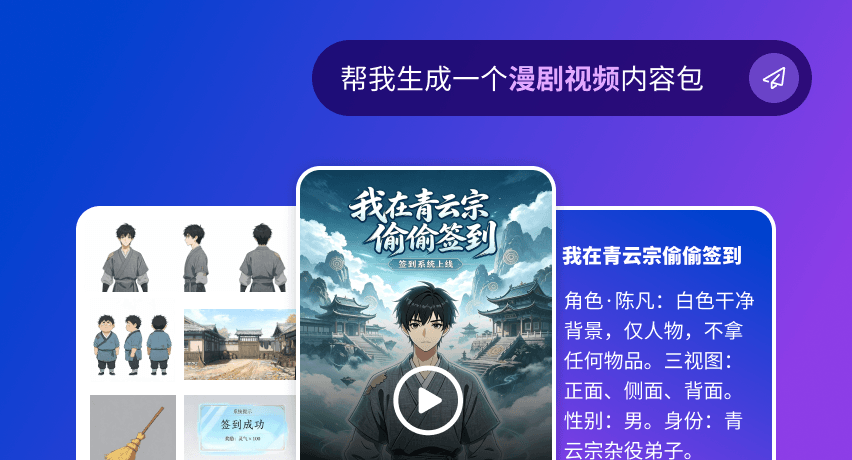
Main features
- Creative image generation: a set of presets built around the idea of wrapping a person or a pet in an unexpected material, including a transparent beer outfit, a Longjing tea outfit and a luosifen bag, all aimed at contrast and visual punch.
- Automatic cutout and material blending: after you choose a preset, the system handles recognition, subject segmentation and texture fitting on its own. No manual outlining, masks or layers.
- Low entry barrier: the whole loop is choose, upload, generate. A result usually lands within seconds, far lighter than desktop photo software.
- Presets keep growing: new presets appear most weeks, and holiday-themed series are added around major dates so creators can ride the trend.
- Image and video output: besides stills, some presets produce short video clips sized for Douyin, Xiaohongshu and WeChat Moments.
- Free basic tier: the basic presets can be used without paying, so newcomers do not have to spend first in order to test the tool.
How to use it
- Open the site and sign in: go to imiaohua.com and register or log in.
- Pick a preset: browse the popular list and compare the sample output before choosing an image or video preset.
- Upload a photo: a front-facing portrait or a half-body shot with even light and nothing covering the subject works best. For pets, try to include the whole head and body outline.
- Press generate: recognition, segmentation and texture blending run automatically and usually finish in seconds.
- Save and use: download the result, crop it to the target platform ratio, and use it as a cover, an in-post image or a chat share.
Where it fits
- Short-video covers: an exaggerated frame buys you the second or two before a viewer scrolls away.
- Social posts: cover images and light-hearted group-chat pictures that open a casual topic.
- Pet accounts: presets such as the roasting bag add an instant gag and a strong before-and-after contrast.
- Marketing material: playful visuals for promo posters or product teasers, cheap enough to use as traffic bait for a campaign.
- Personal fun: turn photos of friends and family into running jokes and trade them on holidays.
Limits and caveats
- Preset-driven, not open prompting: results come from a fixed preset library, so you cannot describe an arbitrary scene the way a general image model would. If a look is not in the library, you cannot produce it.
- Output quality is capped by the input photo: backlight, a hand over the face, group shots and full-body wide angles all tend to segment badly, and side profiles or a lowered head often leave rough edges.
- Quota and preset range change: the free scope and the available presets follow whatever the site states at the time. Some presets may require login or consume credits, and holiday themes are usually time-limited.
- Compliance is on you: get permission before uploading someone else's photo, do not use generated images to impersonate people or to make misleading promotional claims, and confirm portrait rights, copyright and the target platform's rules on AI content before any commercial use.
FAQ
Do I need photo-editing skills to use Miaohua AI?
No. The flow is pick a preset, upload a photo, press generate. Cutout, segmentation and texture fitting are handled by the service, so someone who has never opened a photo editor can still finish a piece.
How long does one image take?
The official description says a few seconds. Real timing depends on photo size, queue load and preset complexity, so peak hours can be slower.
Can the output be used commercially?
The tool itself does not restrict usage, but before commercial use you should confirm three things: permission from the person in the photo, the rights attached to the preset assets, and the publishing platform's policy on AI-generated content. Scenarios that imply a real person endorses a product are better avoided.
Frequently asked questions
Do I need photo-editing skills to use Miaohua AI?
No. The flow is pick a preset, upload a photo and press generate. Cutout, subject segmentation and texture fitting are handled by the service, so people with no editing background can still finish a piece.
How long does one image take?
The official description says a few seconds. Real timing depends on photo size, queue load and preset complexity, so peak hours can be slower.
Can the output be used commercially?
The tool does not restrict usage itself, but confirm permission from the person in the photo, the rights attached to the preset assets, and the publishing platform's AI content policy before commercial use. Avoid scenarios that imply a real person endorses a product.



