

Huadai AI Notes combines quick capture with AI tidying: meeting recordings become highlights and to-dos, and scattered material settles into a personal knowledge base.
Huadai AI Notes: scattered capture and AI tidying behind one door
What the app is
Huadai AI Notes is a card-based AI note-taking app for knowledge workers, built on two claims: capture should be simple, and tidying should be left to AI. Live transcription, card notes, multi-format capture and knowledge search all sit in one app, and the vendor emphasises a one-second launch with no ads — a "don't interrupt the thought" philosophy.
For people who sit in meetings, attend lectures or get an idea on the subway, the deciding factor is rarely the feature list. It is how many seconds it takes to open the app and whether anything has to be organised right after writing. The design here circles those two points.
Main capabilities
- AI recording summaries: transcribe while a meeting or lecture runs, then extract highlights and generate a to-do list. Speed playback and highlight markers make it easy to check what was actually said.
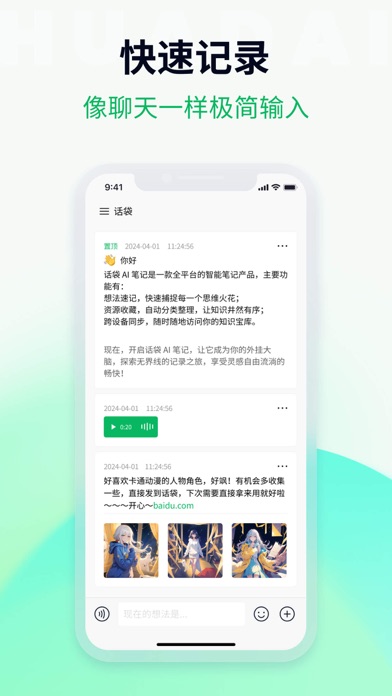
- Card-style quick notes: minimal interaction, write a fragment the way you would send a message. Open it and type.
- Multi-format capture: voice, images, links and text saved in one tap, sorted automatically, so there is no folder structure to build in advance.
- AI knowledge base: fuzzy descriptions still find old notes, and "related notes" links cards with nearby content, gradually weaving a personal knowledge network.
- Offline notes and multi-device sync: write without a network, sync to the cloud once connected, and see the same content on phone and computer.
- Structured output: turn scattered records into an organised note that can be exported and shared.
How to use it
- Install the app and open it, then grant microphone and notification permissions. Transcription depends on the microphone; without it you are left with typing.
- For a passing thought: create a card and write, even one or two lines. Capture first, sort later.
- In a meeting or lecture: start transcription, generate the summary and to-dos afterwards, then mark key passages and re-listen at speed where it matters.
- When you find a good article or image: save it in one tap so it joins the same card system instead of drifting between camera roll and bookmarks.
- To find something old: search with an approximate description, or follow the "related notes" trail.
- Every so often: turn a cluster of cards into a structured note and export it for reporting, review or sharing.
Who it suits
- Product, operations and consulting roles with back-to-back meetings: no more half an hour reconstructing who said what.
- Students and self-learners: lecture transcription plus highlight extraction, so revision does not mean replaying the whole recording.
- Creators and researchers: gathering and connecting material in one place, which makes it easier to recover the original idea when writing.
- Commuters: offline capture, so the thought that arrived on the train is not lost.
Limits to keep in mind
- Transcription and summary accuracy depend heavily on recording quality, accents and overlapping speakers. Verify important conclusions against the source audio.
- AI-generated to-dos read more like a candidate list; owners and deadlines usually need a human to fill them in, so do not treat them as a finished assignment.
- The material does not state free quota, storage limits, subscription pricing or supported system versions; check the app store listing before installing.
- Multi-device sync needs a network: anything added offline appears on other devices only after that device reconnects.
- Knowledge links are generated by an algorithm and are hints rather than conclusions; whether a note is genuinely relevant is still your call.
FAQ
Where does Huadai AI Notes fit best?
In listen-and-write situations such as meetings and lectures: live transcription, then an automatic summary and to-do list. Day to day it holds fragments, images and links.
How accurate is the transcription?
The vendor publishes no specific figure. Results depend on recording quality, accents and people talking over each other, so verify important conclusions against the original audio.
Can it work with other tools?
Yes. Structured notes can be exported and shared, then used in other documents or collaboration tools; check the available export formats inside the app.
Frequently asked questions
Where does Huadai AI Notes fit best?
In listen-and-write situations such as meetings and lectures: live transcription, then an automatic summary and to-do list. Day to day it holds fragments, images and links.
How accurate is the transcription?
The vendor publishes no specific figure. Results depend on recording quality, accents and people talking over each other, so verify important conclusions against the original audio.
Can it work with other tools?
Yes. Structured notes can be exported and shared, then used in other documents or collaboration tools; check the available export formats inside the app.



