

AITubiao is an AI data visualization and analysis tool for people who need to turn Excel, CSV, or web material into charts, written analysis, and reports.
AITubiao: AI Data Visualization and Data Analysis Tool
AITubiao is an AI data visualization and analysis tool built around three core jobs: generating charts, analyzing data, and writing reports. It helps office professionals turn raw spreadsheets into finished visuals and written conclusions with far less manual work. The platform is powered by DeepSeek-series large language models, adding text continuation, multilingual translation, and image asset generation on top of its data processing, so the same dataset can become both a chart and the supporting copy around it.
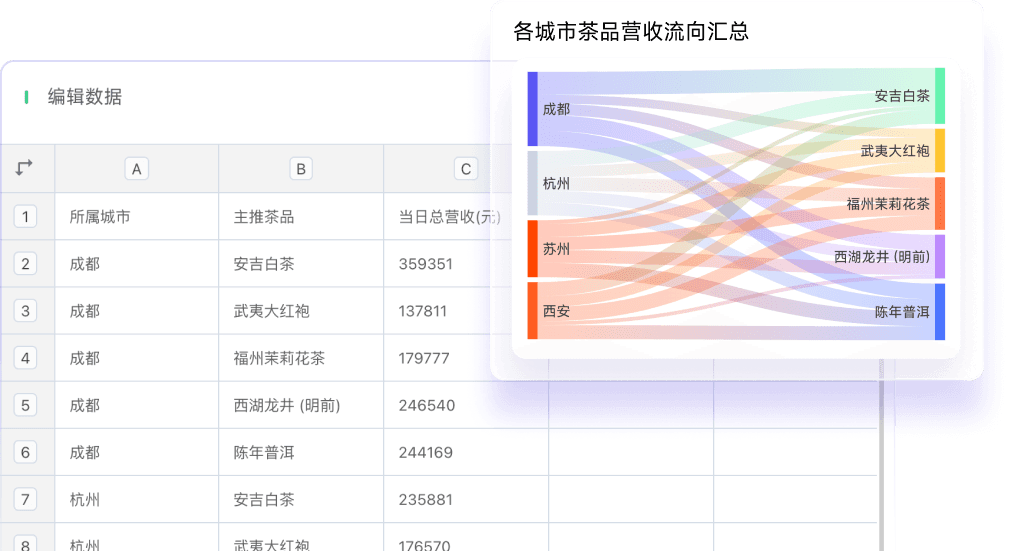
Core Capabilities
AI data charts: Intelligently parses uploaded Excel and CSV files, automatically splits multiple worksheets into separate data tables for individual analysis, then recommends suitable chart types based on field types and data characteristics, and renders styled charts — removing most of the trial-and-error normally involved.
AI data content: Accepts pasted text, file uploads, and web page link scraping as input sources, automatically summarizes the logical structure of the material and extracts it in a structured way. Useful for organizing research, mapping out an argument, and producing a first draft quickly.
Multiple chart types: Provides common chart types such as bar charts, line charts, pie charts, and radar charts, covering category comparison, time trends, composition shares, and multi-dimensional scoring needs.
Rich template styles: Includes a range of chart templates and style options, letting you adjust appearance to match brand colors, layout preferences, or presentation context.
Multiple data sources: Imports data from sources such as Excel and CSV, automatically recognizing and handling formats to reduce manual cleaning steps.
Multiple export formats: Supports mainstream export formats including JPEG, PNG, and PDF, suitable for document illustrations, presentation materials, or web imagery.
AI text generation: Connected to DeepSeek-series models for intelligent text continuation, multilingual translation, and professional polishing — commonly used for chart titles and conclusion paragraphs.
AI image generation: Generates image assets for charts, supported by functions such as intelligent background removal and lossless upscaling.
AI data analysis: Performs multi-dimensional analysis on imported data covering trends, comparisons, correlations, and distributions, then produces a written report interpreting the results.
How to Use It
- Visit the site and register: Open the AITubiao website and sign up or log in.
- Import data: Upload an Excel file to bring your data into the platform.
- Match charts intelligently: Click the "AI parse data" button and let the system analyze data characteristics and recommend and generate a suitable chart.
- Edit and adjust: Use the editing tools to customize the chart — live resizing, color changes, layout adjustments, and adding extra elements.
- Export and share: Export the finished chart and report, or share them within the platform.
For data-driven articles, the path runs from the home page under My Space → Create with AI → choose data content, then pick the entry point you need (such as large-screen dashboards) and enter your generation instruction. Text continuation is triggered by clicking the AI icon after typing in the editor, while image generation works from a text description plus style and size options.
Use Cases
- Social media and content creation: Build charts and data articles sized for social platforms, improving visual appeal.
- Academic research and paper writing: Help researchers and students turn complex data into intuitive charts that support academic argument.
- Data dashboards and live monitoring: Create dashboards for monitoring and presenting key indicators to support decisions.
- Education and training: Produce courseware and training material that makes data more vivid and easier to understand.
- Personal projects and creative design: Support individual creative projects by quickly generating charts and design elements.
Limitations and Notes
- Automatic chart type recommendations are derived from data characteristics; complex or unusual presentation needs still require human review and fine-tuning.
- Automatically generated analysis text serves as an aid. Key conclusions should be checked against the original data before being relied upon.
- Asset generation and web scraping must respect the terms of the material being used; data and content under copyright should be imported with care.

Frequently asked questions
Who is AITubiao for?
It suits office professionals, academic researchers, and content creators who need to process and present data. Typical uses include social media graphics, research and paper figures, monitoring dashboards, teaching courseware, and personal creative projects.
Which data formats can AITubiao import?
Data can be imported from sources such as Excel and CSV, and the system recognizes and handles formats automatically. It also parses multiple input sources including pasted text, file uploads, and web page links.
Can AITubiao generate charts automatically?
Yes. After uploading an Excel file, click the AI parse data button and the system analyzes data characteristics, recommends a suitable chart type, and generates bar, line, pie, or radar charts that can then be adjusted in color, layout, and elements.
Which formats can charts and reports be exported to?
Mainstream formats including JPEG, PNG, and PDF are supported, making exports convenient for documents, presentations, and web pages.
What does AITubiao's AI data analysis produce?
It provides multi-dimensional analysis of imported data — trend, comparison, correlation, and distribution analysis — and generates corresponding written reports to help interpret what the data means.



